
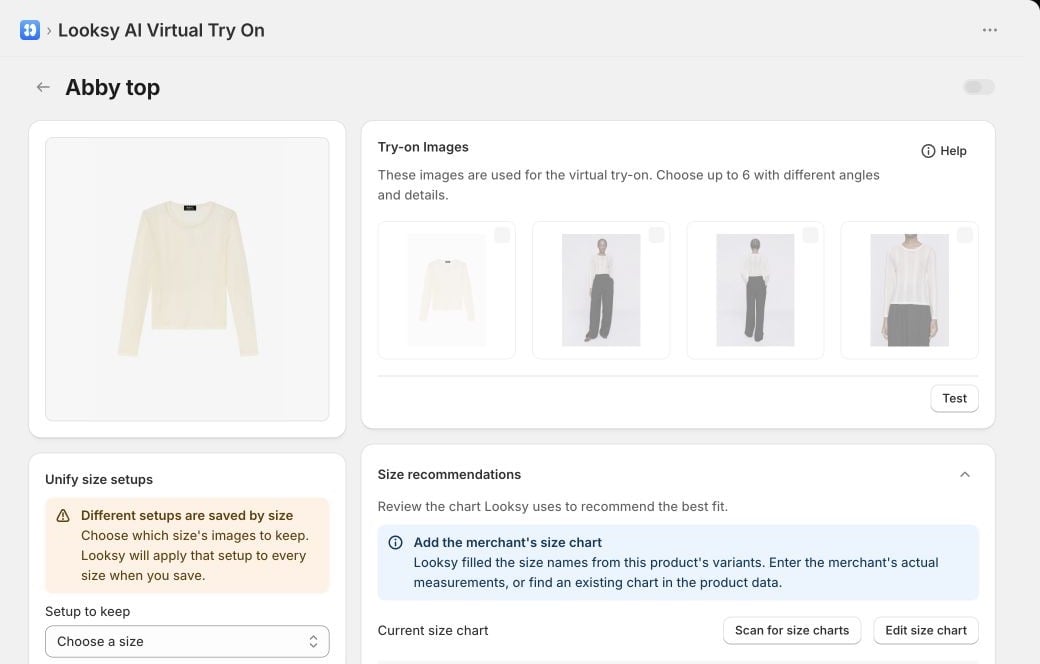
Review the product's Try-on Images and Size recommendations together before making the shopper action available. This example uses a Looksy test store.
Before you start
For each product, confirm that:- Try On is enabled;
- Shopify contains the correct size variants, or the product is genuinely one-size;
- you have the merchant’s real size-chart measurements;
- size labels, units, ranges, and regional systems are accurate.
Configure a product’s size chart
- In Shopify Admin, open Looksy, then select Products.
- Select the product name to open its configuration.
- Open Size recommendations.
- Select Scan for size charts to look for an existing chart in the product data, or select Edit size chart to enter the chart manually.
- Review the measurement unit, the measurements used, every size label, and every range. Enter only measurements supplied by the merchant.
- If Looksy shows Needs review, choose the Shopify option that represents the product’s purchasable size.
- Select Save changes.
Scanned size charts still require merchant review. Looksy can convert an existing chart into structured ranges, but it must not invent missing measurements.
Turn on the shopper feature
- In Looksy, open Settings.
- Select Features.
- Turn on Recommend sizes from my size charts.
- Review the Storefront button label. The default action is Find my size.
- Select Save.
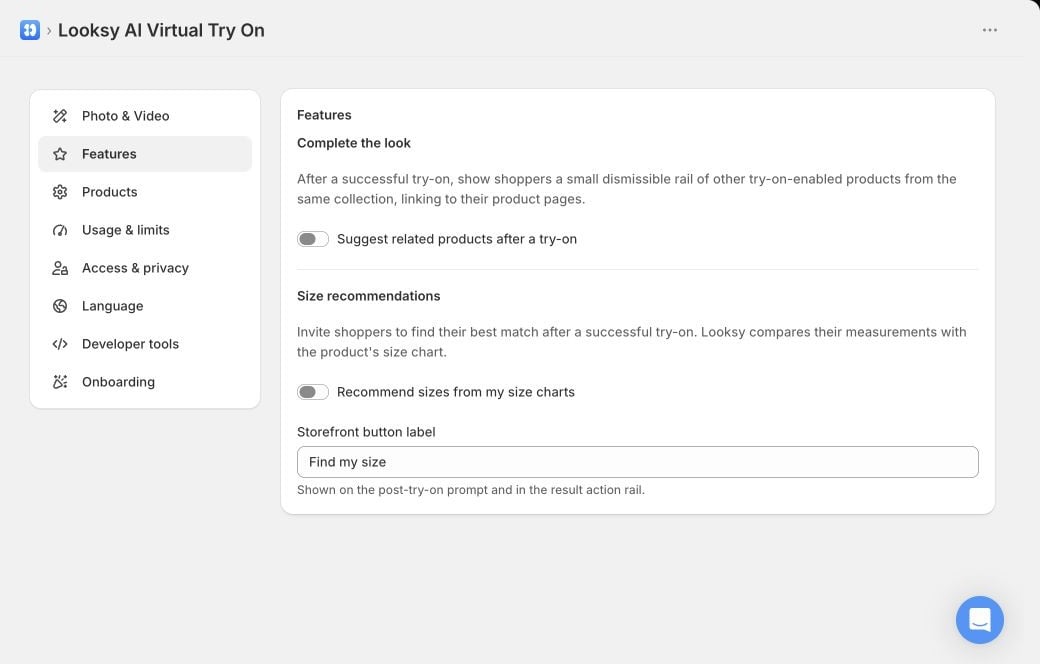
Complete the Look and Size recommendations are separate optional shopper features. This example uses a Looksy test store.
What shoppers experience
- The shopper completes a photo or Live Video try-on.
- They select Find my size, or the storefront label you configured.
- Looksy requests only the measurements relevant to that product’s chart and lets the shopper choose centimetres or inches.
- Looksy compares those measurements with the chart and displays a size suggestion with a confidence level.
Exact Shopify variant selection
In Advanced size variant mapping, you can turn on Select the exact available variant. When Looksy can prove one exact, currently available Shopify variant, it preserves the shopper’s other choices—such as colour or fit—and selects that size. It never substitutes a different colour, fit, audience, material, region, or other option. If the mapping is ambiguous, the variant changed, the exact variant is unavailable, or the theme cannot confirm the selection, Looksy fails safely: it shows the recommended size label and asks the shopper to choose it manually.Troubleshooting
Find my size does not appear
Find my size does not appear
Confirm that the global feature is enabled, the product has a saved size chart or valid one-size setup, Try On is enabled for the product, and the shopper has completed a successful try-on.
The product says Needs review
The product says Needs review
Open the product’s size chart, choose the Shopify option that contains its sizes, verify the chart, and save the setup.
No size matches the shopper's measurements
No size matches the shopper's measurements
Check the selected unit and the chart’s measurement ranges. A recommendation is unavailable when the submitted measurements do not match the saved chart.
The size label appears but the variant is not selected
The size label appears but the variant is not selected
This is the safe fallback when Looksy cannot prove that one exact matching variant is available and compatible with the current product form. Review the advanced mapping and Shopify availability; never tell shoppers that another variant was selected when only a label is shown.
Virtual Try-On Accuracy
Explain what the generated visual can and cannot prove.
Best Practices
Roll out shopper-facing features with accurate expectations.