
How does Looksy appear on my product pages?
On an eligible product page, Looksy automatically places the Try On button over the main product image. The shopper opens Looksy there, and the generated preview appears in the same product-image area. You do not add an app block to every product template or choose a page section for Looksy. Three settings have separate jobs:- Products and collections control which product pages offer try-on.
- The app embed turns the storefront experience on for the theme.
- Button settings control the image corner, appearance, and offsets.
Turn Looksy on for the theme
- Open Online Store → Themes in Shopify.
- Choose the theme you want to test and open Customize.
- Open App embeds.
- Enable Looksy and save.
- Preview a representative product page.
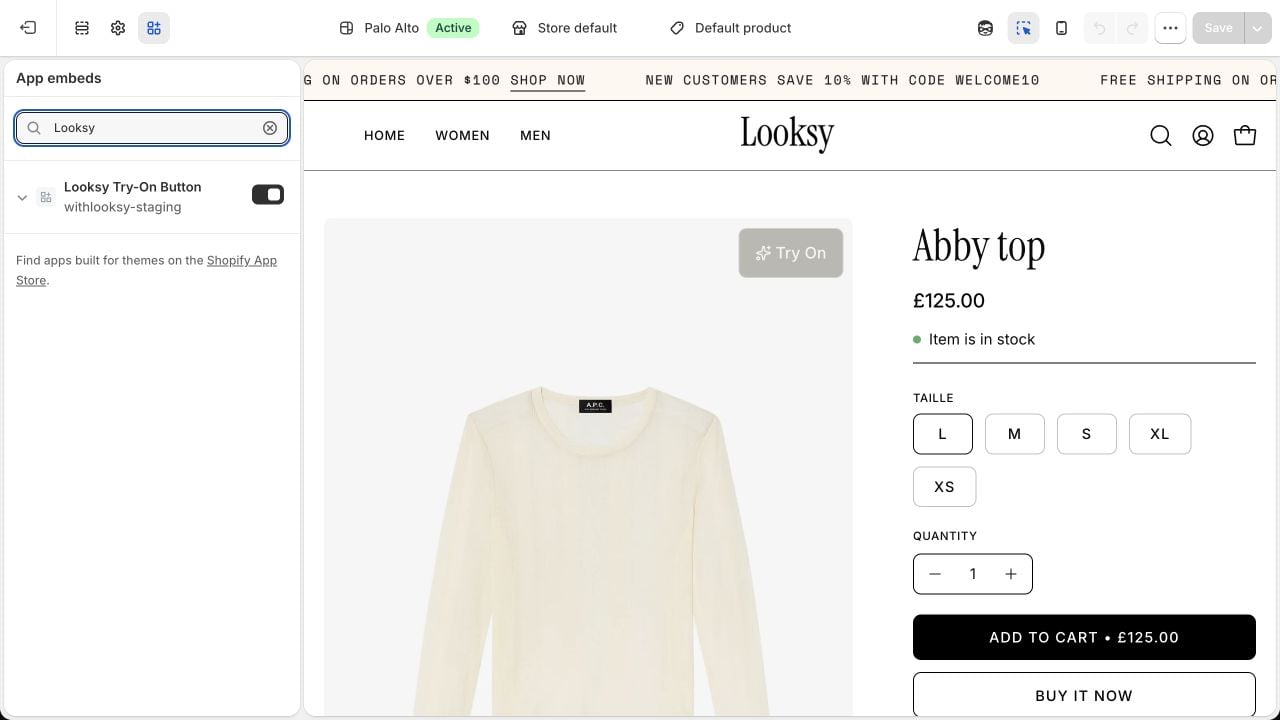
This switch activates Looksy's automatic product-image button for the theme. Enable it, then save. This example uses a Looksy test store.
What should I verify?
- the button appears over the main product image rather than elsewhere on the page;
- the selected image corner does not cover important product details or gallery controls;
- the generated preview appears in the same product-image area;
- product and variant selection still work;
- the complete try-on flow works on mobile and desktop;
- dialogs are not hidden behind theme elements;
- there is no unexpected layout movement or blocked interaction;
- products without the expected data fail clearly;
- other app blocks continue to work.
Does Looksy work with every theme?
Theme compatibility cannot be guaranteed without testing. Standard Shopify theme patterns may require less adjustment than heavily customized themes, but both should be verified before publication.What should I include in a support request?
Send the theme name and version, preview URL, affected product URL, device and browser, screenshots or a recording, and the exact steps that reproduce the issue.Custom Styling
Adjust the presentation after compatibility is verified.
Common Issues
Diagnose installation and storefront problems.