
What can I configure for each product?
Each enabled product can have its own try-on imagery, appearance-specific setup, size chart, direct try-on link, and model-image workflow. Open Looksy → Products, then select the product you want to configure.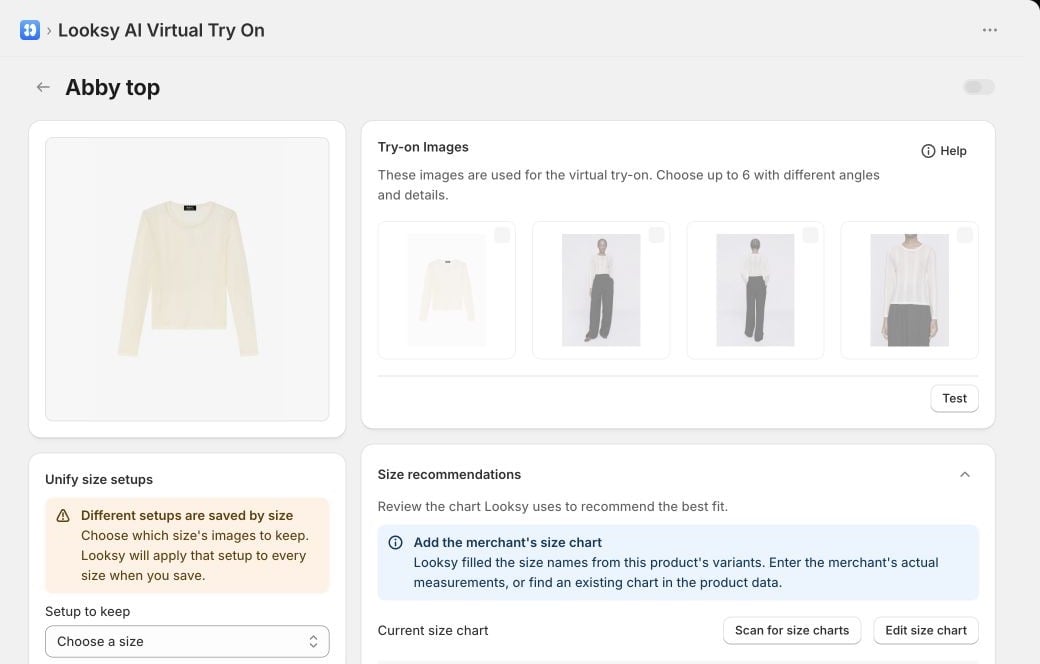
Review try-on imagery, appearance and shared-size setup, and Size recommendations from the product configuration. This example uses a Looksy test store.
Choose try-on images
In Try-on Images, choose up to six useful product images with different angles or details. These images are inputs to the virtual try-on; they are not extra storefront gallery positions. Prefer images that show the product clearly and represent the item the shopper will receive. See Image Requirements before combining weak or inconsistent source images.Configure appearances and sizes
Looksy treats visual options and sizes differently:- Visual options such as colour, pattern, or material can keep separate try-on imagery.
- Sizes within the same appearance share one try-on-image setup.
- If older configuration exists separately for several sizes, Looksy asks which size’s setup to keep before unifying them.
Review size recommendations
The Size recommendations card lets you review or edit the product’s size chart and, where supported, map recommendations to available Shopify variants. The generated try-on image itself does not infer a shopper’s size. See Find Your Size for the shopper flow and accuracy boundaries.Use product defaults for future items
Under Settings → Products, you can:- turn try-on on automatically for products added in future;
- use each new product’s featured image by default; or
- turn that option off so Looksy can combine up to four gallery images.
Always save and test a representative product page after changing imagery, appearance, size-chart, or targeting settings.
Direct Try-On Links
Share a configured product’s try-on flow by link or QR code.
Looksy Studio
Create an on-model product image and review it before adding it to Shopify.