
How do I customize the Looksy button?
Looksy places the button over the main product image automatically. Open the app embed in Shopify’s theme editor only to adjust that button’s corner and appearance. The Customize button action in the Looksy dashboard can take you there when the active theme and plan are ready. You do not place the app embed inside a product-page section. It is the theme-wide switch and appearance control for the button Looksy places over the product image.Open the appearance controls
- In Shopify admin, go to Online Store → Themes.
- Select Customize for the intended theme.
- Open App embeds → Looksy Try-On Button.
- Enable the embed if necessary.
- Change the supported settings and save the theme.
Available settings
The current extension includes controls for the button’s product-image corner, text, text and background color, icon, typography, border radius, padding, offsets, and result-thumbnail radius. These settings do not move the app embed into a page section. The exact controls shown can vary with the installed extension version.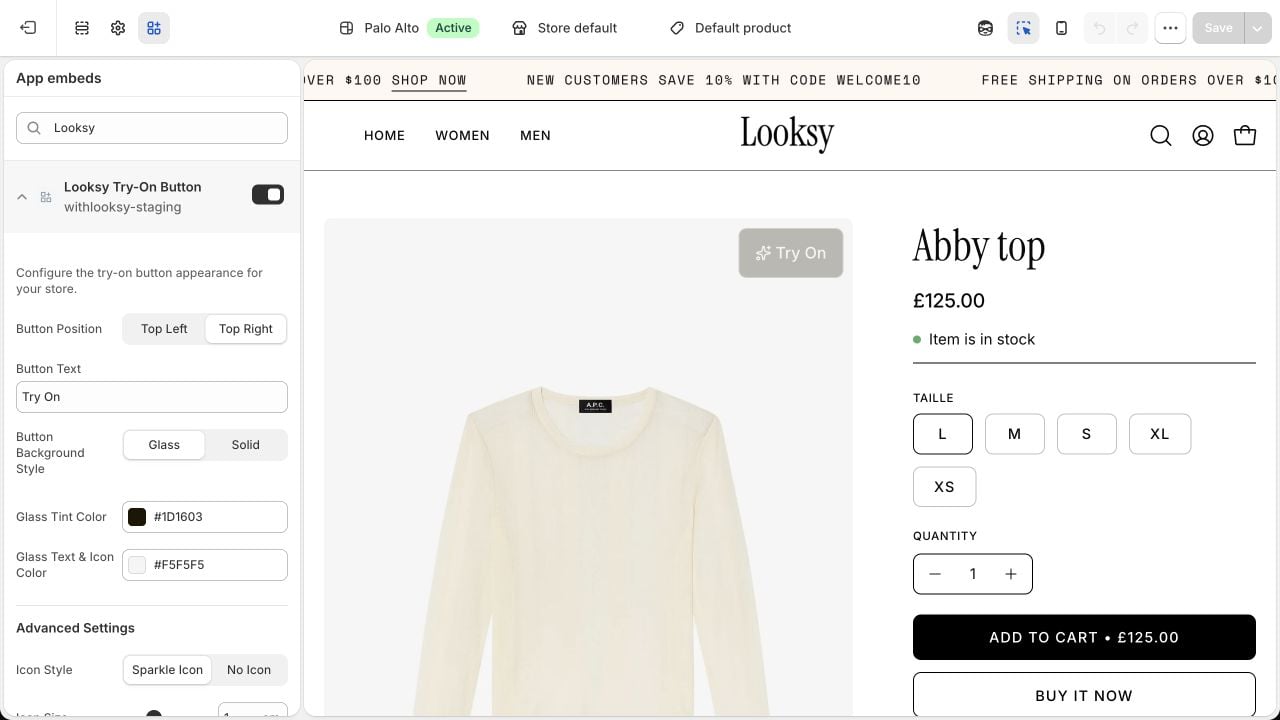
Adjust the button over the product image while checking the storefront preview, then save when it is clear and unobtrusive. This example uses a Looksy test store.
- use short, literal button text;
- maintain sufficient color contrast;
- select a product-image corner that does not cover important details or gallery controls;
- adjust spacing only as needed for the current theme;
- retain an icon only when it remains understandable and uncluttered.
Verify before publishing
Test representative product templates, variants, image aspect ratios, desktop widths, and mobile devices. Confirm the button remains visible, readable, keyboard reachable, and separate from other overlays.Theme behavior can change after a theme update or template edit. Re-test Looksy whenever the storefront theme changes materially.