Ecommerce
AI Virtual Try-On vs. Product Videos
Virtual try-on solves fit and cuts returns; product videos sell features and stories—use the right tool for each Shopify product.

When choosing between AI virtual try-on tools and product videos for your Shopify store, the decision depends on your product type and customer needs:
AI Virtual Try-On: Ideal for wearables like clothing, eyewear, or beauty products where fit and appearance are key. It allows customers to see how items look on them, reducing returns by up to 64% and increasing engagement by 180%.
Product Videos: Perfect for showcasing product features, movement, or usage. Videos can increase purchase likelihood by 64% and improve conversion rates by up to 80%.
Quick Comparison
Feature | AI Virtual Try-On | Product Videos |
|---|---|---|
Customer Role | Interactive (upload photo) | Passive (watch video) |
Key Focus | Fit and appearance | Storytelling and features |
Conversion Boost | Up to 94% | Up to 86% |
Return Reduction | High (fit-related issues) | Moderate |
Setup Effort | Medium (3D/AR assets) | High (filming/editing) |
For wearables or fit-critical items, virtual try-on is a game-changer. For products requiring demonstration or storytelling, videos are a better fit. Many successful stores combine both to maximize results.
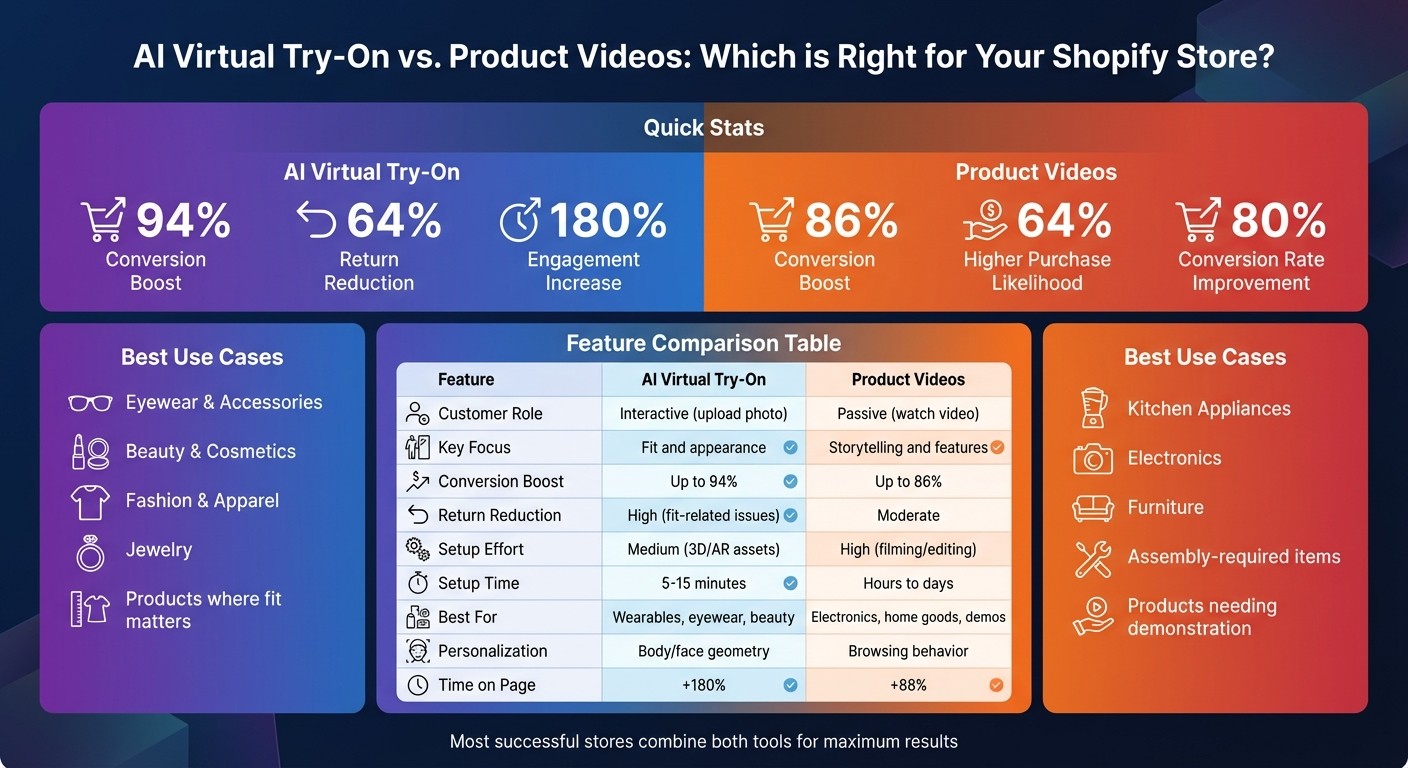
AI Virtual Try-On vs Product Videos: Feature Comparison for Shopify Stores
What is AI Virtual Try-On?
AI virtual try-on technology allows shoppers to see how products will look on them before making a purchase. By uploading a photo, customers can instantly visualize themselves wearing or using the item. This is made possible through a combination of AI and augmented reality (AR), which overlays products onto customer photos, creating a realistic preview. The best part? There’s no need for downloads, apps, or even granting camera permissions.
For Shopify stores, this transforms the shopping experience. Instead of just viewing static images of models, customers actively engage with the products. Modern generative AI takes this further by producing highly realistic visuals of customers wearing or using the item, moving beyond older AR overlays that often felt clunky or fake. It even accounts for fabric behavior - like how silk drapes versus how denim stretches - offering a more accurate sense of fit and feel.
Main Features of AI Virtual Try-On
The standout feature is real-time visualization, which works seamlessly across all devices. Whether shoppers are using iOS Safari, Android Chrome, or a desktop browser, the experience is consistent and smooth. The technology quickly processes photos and generates lifelike images, even showing products from different angles.
For Shopify store owners, the integration is simple. Thanks to native theme extensions for Shopify 2.0, tools like this work effortlessly with themes such as Dawn. No coding is required. Once the app is installed and products are selected, a try-on button automatically appears on the relevant product pages.
Privacy is another key consideration. Many platforms now process images directly on the customer’s device, ensuring that photos remain private and never leave their phone. This privacy-first approach addresses concerns shoppers might have about uploading personal images.
Benefits for Shopify Store Owners
AI virtual try-on doesn’t just enhance the customer experience - it delivers measurable business results. For example, customers spend 150% more time on product pages when virtual try-on is available. Even more striking, incorporating 3D and AR features can boost fashion store conversion rates by up to 94%.
Returns also decrease significantly. Since 62% of returns happen because the item looked different in person, this technology helps shoppers make better-informed decisions. Fewer returns mean reduced shipping costs and happier customers who receive exactly what they expected.
The potential for growth in this space is massive. The global virtual try-on market is expected to grow from $11.38 billion in 2024 to $46.42 billion by 2030. For Shopify store owners, adopting this technology is no longer optional - especially for categories like eyewear, clothing, and accessories, where fit and style are critical to purchase decisions.
Up next, we’ll explore how product videos can further enhance visual commerce.
What are Product Videos?
Product videos are powerful marketing tools that bring products to life using motion and sound. They showcase details like how fabric moves, how a clasp works, or the scale of furniture in a room. Think of them as the bridge between online browsing and the experience of holding a product in your hands - essential for online shoppers who can’t physically interact with items before buying.
For Shopify stores, product videos offer a “try-before-you-buy” vibe. They answer questions static images can’t: How does a dress flow when someone walks? How big is this product compared to everyday objects? What’s the assembly process like? By addressing these concerns, videos help reduce hesitation and build confidence in buyers. In fact, statistics show that 89% of consumers have been persuaded to make a purchase after watching a product video, and shoppers are 64% more likely to complete a purchase. Even better, product pages with videos can see conversion rates jump by as much as 80%.
Main Features of Product Videos
Product videos rely on storytelling to showcase a product’s value. They grab attention in the first few seconds with engaging hooks, highlight key features with clear messaging, and use emotional appeals to connect with viewers. Ideally, videos are short and sweet - 30 to 60 seconds is the sweet spot, with these lengths typically maintaining a 50% engagement rate.
Creating these videos is easier than ever. While professional studio setups are still an option, Shopify sellers are increasingly using smartphones and natural lighting to produce high-quality content. Popular formats include:
How-to tutorials: Show setup or usage instructions.
Explainer videos: Address specific problems the product solves.
Unboxing videos: Highlight packaging and first impressions.
Testimonial videos: Feature real customer reviews.
Shopify makes video integration simple. You can embed videos directly on product pages, homepages, or blog posts in formats like MP4 or WebM. Speed is critical - videos should load in under 4 seconds to avoid losing viewers. Adding captions or text overlays is also a smart move since many people watch videos without sound.
How Shopify Stores Use Product Videos
Product videos shine when demonstrating fit and movement, making them especially useful for apparel and home goods. For clothing, they show how garments move on different body types and sizes. For furniture, they provide a sense of scale by placing items in real-life settings alongside familiar objects. This added context helps shoppers visualize how products will fit into their lives.
The results speak for themselves. For example:
Artsabers, a Shopify merchant, saw a 25% boost in conversion rates after introducing shoppable video content.
Ava Estell, a skincare brand, used shoppable videos on its homepage and product pages to achieve a 4x increase in site engagement.
A fast fashion retailer focused on sizing and fitting issues through videos, leading to a 0.7% increase in conversions and a 5% drop in returns within six months.
Beyond boosting sales, product videos can cut down on customer support inquiries. They can visually demonstrate assembly instructions, care tips, or usage techniques far more effectively than text. On average, websites with video content see a 4.8% conversion rate, compared to 2.9% for those without.
Next, we’ll dive into how these benefits stack up against AI virtual try-on tools to help Shopify stores decide which visual tool fits their needs best. This decision is part of a broader strategy involving AI tools for Shopify stores to optimize the entire customer journey.
AI Virtual Try-On vs. Product Videos: Direct Comparison
Now that we’ve broken down the features of each tool, let’s put them side by side. Product videos shine in emotional storytelling, showcasing items in lifestyle settings to create a connection. On the other hand, AI virtual try-on tools aim to reduce buyer doubts by demonstrating fit, scale, and how products look on the shopper - making it about tangible results rather than emotional appeal.
With AI virtual try-on, users take charge by uploading their photos and exploring different angles. Product videos, in contrast, offer a passive viewing experience. However, adding interactive elements like hotspots or “tap-to-buy” overlays can boost engagement, with some formats extending viewer attention by 47%.
The personalization aspect also differs. AI virtual try-on adapts to the shopper’s physical traits - like body shape, face structure, or skin tone. Product videos, however, tailor content based on user behavior, such as showing a dry skin tutorial to a skincare enthusiast. Interestingly, 71% of consumers show a preference for AI-powered personalized shopping. The table below highlights these differences clearly.
Feature Comparison Table
Feature | AI Virtual Try-On | Product Videos |
|---|---|---|
User Role | Active control by the shopper | Passive viewing |
Primary Goal | Fit and reality verification | Storytelling and emotional appeal |
Engagement | Very High (+180% time on page) | High (64% higher purchase intent) |
Interactivity | High (AR/3D manipulation) | Low to Medium (if shoppable) |
Personalization | Based on body/face geometry | Based on browsing behavior |
Setup Effort | High (3D/AR assets required) | Low to Medium (AI-generated videos) |
Return Impact | High reduction (up to 64%) | Moderate reduction |
Primary Analytics | Try-on sessions, fit trends | Watch time, drop-off rates |
Mobile Optimization | Can be data-heavy for browsers | Requires fast loading (under 4 seconds) |
Shopify Integration | Seamless with compatible apps | Native support for MP4/WebM |
AI Virtual Try-On: Pros and Cons
Pros | Cons |
|---|---|
Provides insights into customer fit preferences and body proportions | High setup effort - requires 3D or high-quality 2D assets |
Interactive experience with real-time AR manipulation | Can be data-heavy for mobile browsers |
Reduces returns by verifying fit before purchase (up to 64%) | Requires more technical integration compared to video embeds |
Visualizes products on the shopper’s body or face | Limited to products where fit is a key factor |
Increases engagement (+180% time on page) | May require photo uploads, which some users may hesitate to provide |
Product Videos: Pros and Cons
Pros | Cons |
|---|---|
Great for storytelling and creating emotional connections | High drop-off rates if videos lack interactive elements |
AI can generate videos from existing product images | Passive experience unless interactivity is added |
Shoppable formats streamline “add-to-cart” actions | Doesn’t offer personalized fit confirmation |
64% of shoppers are more likely to buy after watching video content | High-quality production can be costly and time-intensive |
Demonstrates product movement, drape, and functionality effectively | Viewers have short attention spans, needing a strong opening |
Useful for showcasing assembly, care instructions, and usage |
Performance Metrics and Results
Both AI virtual try-on tools and product videos bring measurable improvements to e-commerce performance. For example, augmented reality (AR) try-on experiences can boost conversion rates by an impressive 94%, while product videos have been shown to increase the average order value (AOV) by 30%.
Fit-related uncertainty is a major issue, causing 46% of cart abandonments. AI virtual try-on tools help customers confirm product fit, reducing return rates by 30%. In the U.S., product returns are a costly problem, averaging around 21% of the order value.
Product videos also make a significant impact. They increase time spent on a page by 88%, triple conversion rates compared to static images, and reduce cart abandonment by 40%. Additionally, products featuring videos see an 86% higher conversion rate compared to those without. For an at-a-glance comparison, the table below outlines these performance metrics.
Performance Metrics Comparison Table
Metric | AI Virtual Try-On | Product Videos |
|---|---|---|
Conversion Rate Lift | 94% higher conversion rate with AR experiences | 86% higher than products without video |
Average Order Value (AOV) | 10–25% increase | 30% increase |
Time on Page | Data not reported | +88% (video engagement) |
Cart Abandonment Impact | Addresses fit uncertainty (46% of shoppers affected) | 40% reduction with shoppable videos |
Return Rate Impact | Mitigates fit-related returns | Reduces returns from visual mismatches by 30% |
User-Generated Content Priority | N/A | 37% of consumers prioritize UGC videos |
Purchase Likelihood | High for fit-critical items | 50% more likely to buy with UGC videos |
Real-World Impact on Shopify Stores
The benefits of these tools go beyond just numbers - they bring real, tangible growth to Shopify stores. For products where fit is critical, like eyewear, jewelry, and apparel, Understanding how AI virtual try-on technology works shows why these tools provide a strong return on investment by addressing shoppers’ concerns about fit. Uri Minkoff, CEO of Rebecca Minkoff, highlights this advantage:
“3D media makes for a much more interactive shopping experience. Customers can examine our products from every angle… which helps them get a better sense of quality, size, and other details that matter”.
Product videos, on the other hand, are particularly effective for items that require demonstration, such as electronics, home goods, and technical products. The 3x conversion rate boost from shoppable videos is especially impactful for the 20% of products that typically generate 80% of revenue. With nearly 75% of Gen Z and Millennials shopping on smartphones, optimizing both AI try-on tools and videos for mobile is crucial to maximizing their impact.
Next, we’ll explore how these tools can be set up and integrated seamlessly with Shopify.
Setup and Ease of Use for Shopify
Getting these tools up and running on Shopify varies in complexity. For AI virtual try-on tools, the process is straightforward. Most of these apps are designed as native Shopify integrations, allowing them to connect directly through App Embeds. Typically, setting up a virtual try-on tool takes just 5–15 minutes. This involves installing the app and uploading assets, which the system then processes to create interactive try-on experiences.
On the other hand, product videos demand more effort. You’ll need to film, edit, or convert photos into video loops. Tools like Spotlight: Video Loops simplify this by automatically embedding videos on collection pages and offering over 30 templates to transform photos into videos. However, creating high-quality product videos can take hours or even days. Once your videos are ready, you’ll also need to ensure they align with Shopify theme requirements for seamless integration.
Setup and Maintenance Comparison Table
Feature | AI Virtual Try-On | Product Videos |
|---|---|---|
Initial Setup Time | 5–15 minutes (app install + asset upload) | Hours to days (filming, editing, uploading) |
Technical Skills Required | Minimal (app-based integration) | Moderate (video editing knowledge helpful) |
Ongoing Maintenance | Periodic accuracy audits | Manual replacement of outdated footage |
Inventory Integration | Automated sync with Shopify inventory | Manual tagging of shoppable links |
Theme Updates | Automatic via clean code | May require manual embed adjustments |
Primary Cost Driver | Monthly subscription + usage credits | Content production and storage fees |
Working with Shopify Themes
After setup, ensuring smooth integration with your Shopify theme is vital. Both tools are compatible with modern Shopify 2.0 themes like Dawn and Refresh. Virtual try-on apps are particularly efficient, integrating as theme extensions without adding custom code. This approach keeps your theme’s integrity intact. Look for apps that rely on Shopify App Embeds and offer diagnostic tools or “health indicators” to ensure theme embeds stay synchronized with store updates.
For product video tools, such as Spotlight, videos are auto-embedded on collection pages. However, these tools come with additional costs tied to content production. Virtual try-on pricing, by comparison, ranges from free to around $49 per month. Both tools can enhance your Shopify store’s performance, but their cost structures and maintenance requirements differ.
As Thibault Mathian, Founder of Genlook, aptly states:
“The era of ‘imagining’ how a product looks is over. In 2025, customers expect to see it”.
For stores with large catalogs, virtual try-on tools are especially scalable. They can generate on-model images from existing flat-lay photos, saving time and effort. Meanwhile, product videos require a separate video for each SKU. While these videos can be reused indefinitely, creating them initially is labor-intensive. When product designs change, videos must be re-shot and re-edited. In contrast, virtual try-on tools can quickly update visuals by processing new product photos.
When to Choose AI Virtual Try-On
Decision Factors to Consider
Now that setup and integration have been covered, the choice between AI virtual try-on and product videos boils down to your product’s specific requirements and your customers’ primary concerns. If your audience needs a personalized understanding of how a product will look - whether it’s influenced by body shape, facial structure, or skin tone - using customer experience tools like virtual try-on is the way to go.
On the other hand, product videos shine when showcasing features like texture, weight, movement, or mechanical functionality that remain the same for all users. For instance, kitchen appliances are better suited for product videos, while eyewear benefits greatly from virtual try-on technology.
Another key consideration is your return rates. Virtual try-on can significantly reduce returns by addressing fit and appearance concerns upfront, allowing shoppers to see how a product looks on them before buying. While product videos help set realistic expectations, they can’t offer the tailored fit insights that virtual try-on provides.
Interactivity also plays a role. Virtual try-on requires active customer participation, like uploading a photo or using a live camera, which not only boosts engagement but also builds trust. This personalized experience ties back to earlier discussions about lowering return rates and keeping customers engaged.
These factors highlight why virtual try-on is particularly effective in certain industries, as detailed in the examples below.
Best Use Cases for AI Virtual Try-On
Eyewear and accessories are prime candidates for virtual try-on. Face-tracking technology allows customers to see exactly how glasses or jewelry complement their unique facial features, providing a tailored shopping experience.
Beauty and cosmetics products, such as lipstick, foundation, or hair dye, rely heavily on how they interact with individual skin tones or hair shades. Virtual try-on offers a personalized preview that product videos simply can’t replicate.
Fashion and apparel also reap major benefits, especially in categories prone to high return rates due to fit issues. Using virtual try-on for “hero” items like denim, tops, or dresses can help shoppers feel more confident in their choices, leading to fewer returns. You can even estimate the ROI of virtual try-on for your specific store to see the potential impact on your bottom line. Advanced tools even simulate how fabrics like silk, leather, or denim will drape and stretch on a person’s body, thanks to generative AI that mimics fabric physics.
For retailers with large and varied catalogs, virtual try-on is a scalable solution. It transforms product photos into personalized visuals, eliminating the need for separate video shoots. This is particularly useful for stores with frequently changing inventories or products available in multiple sizes and colors.
Looksy: AI Virtual Try-On for Shopify
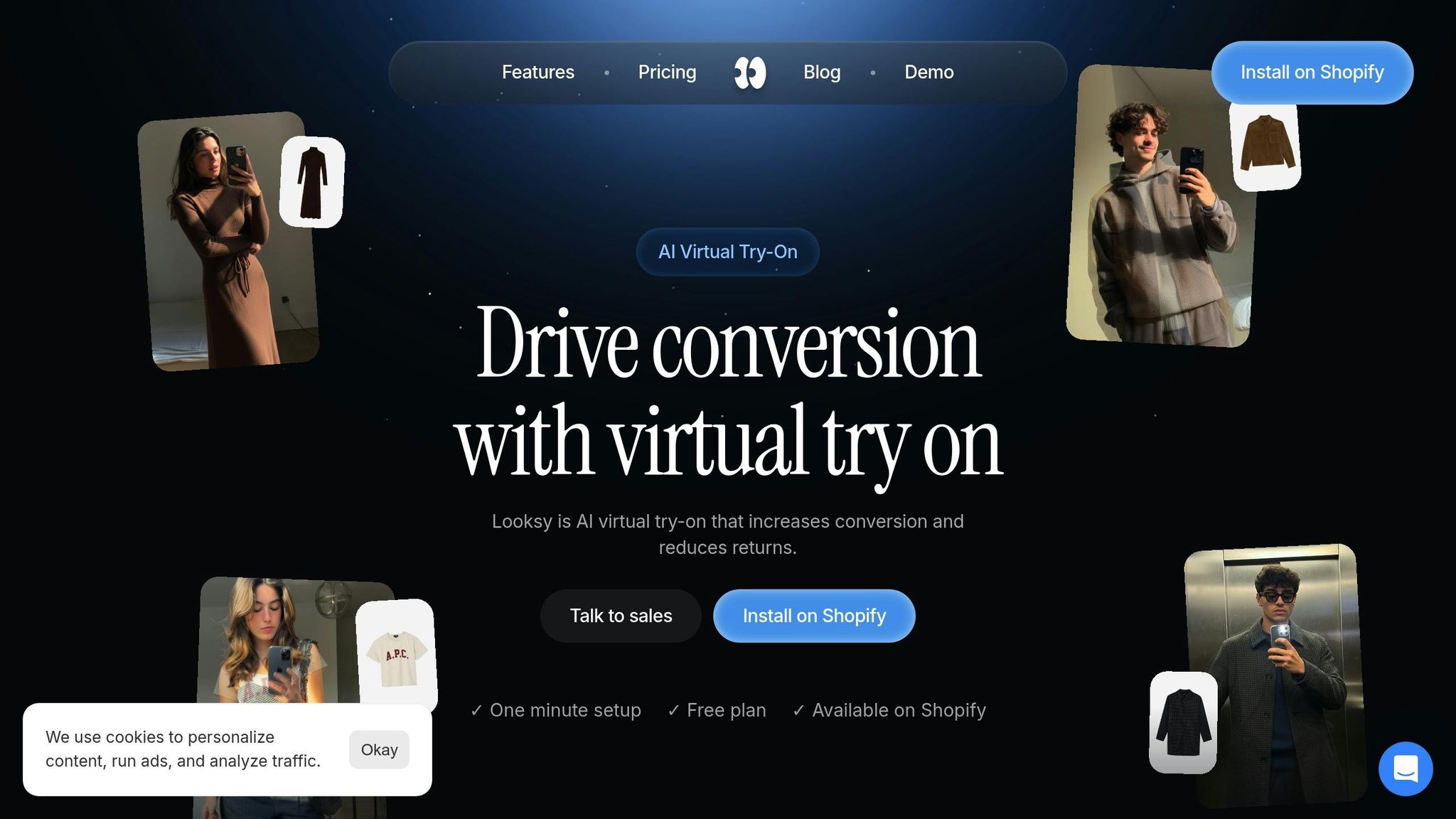
Looksy makes adding virtual try-on capabilities to Shopify stores simple, with an easy setup process and seamless integration.
Looksy’s Key Features
Looksy offers a one-click installation that fits your Shopify theme in under a minute, requiring no coding skills. Customers can upload a photo and see how products look on them in just about 20 seconds.
Using generative AI, Looksy places products directly onto customer-uploaded photos, cutting out the need for expensive 3D models that can cost up to $300 per SKU. To keep your site running smoothly, Looksy loads asynchronously and activates only when clicked, ensuring it doesn’t slow down page performance.
Privacy is a top priority. Customer photos are processed securely and are never stored or shared. The try-on button integrates seamlessly into your product gallery - no annoying popups or redirects. Plus, Looksy includes built-in analytics to track try-on usage and monitor conversion rates.
Looksy Pricing Plans
Looksy offers a range of pricing options to suit businesses at any stage of growth.
Plan | Monthly Price | Included | Additional credits | Key Features |
|---|---|---|---|---|
Free | $0 | Unlimited try-ons | N/A | Up to $100 of additional revenue, Looksy branding |
Starter | $14.99/month | 100 photo try-on credits | $0.14 each | Remove Looksy branding; unlimited size, bundles & email capture |
Growth | $29/month | 300 photo try-on credits | $0.12 each | Up to $1,000 of additional revenue |
Scale | $79/month | 600 photo or video credits | $0.10 each | Realtime video try on; unlimited additional revenue |
There is no annual billing, and the free plan includes unlimited try-ons so you can test the platform before paying anything.
Why Looksy is a Great Fit for Shopify Stores
Looksy helps Shopify merchants tackle two big challenges: high return rates and slow conversions. By letting shoppers see the product on themselves before they buy, the platform boosts customer confidence and supports better purchase decisions. Results vary by store, so use your own catalog, traffic, and return rates to estimate the impact.
With a 4.6-star rating from 6 reviews on the Shopify App Store, users love how effortlessly Looksy integrates the try-on button into product galleries. Many merchants report higher conversion rates and more customer trust within just the first month of using the tool.
Unlike traditional AR solutions that require app downloads, complicated setups, or per-seat pricing, Looksy works on any browser - whether on mobile or desktop. Its usage-based pricing ensures it scales with your business needs, and the analytics dashboard helps you pinpoint which products benefit most from virtual try-ons. This allows you to focus your efforts exactly where they’ll make the biggest impact.
Conclusion: Choosing the Right Tool
Key Takeaways
When it comes to using Shopify features that boost online sales, AI virtual try-on and product videos serve distinct roles in the customer journey. Product videos are perfect for creating emotional connections and explaining how a product works. In fact, 89% of consumers say a video has convinced them to make a purchase. These videos shine at the top of the sales funnel, helping with discovery and storytelling.
On the other hand, virtual try-on tools are invaluable when customers need to see how a product looks on them. This is especially important for wearables like eyewear, jewelry, or apparel, where concerns about fit often lead to returns. The most successful stores combine both tools to guide customers from initial interest to confident purchasing decisions.
Final Recommendation
Choose the tool that solves your product’s biggest challenge. If returns are a major issue for wearable items, prioritize virtual try-on. If your product has complex features or needs more visibility, start with product videos to explain and engage.
For fashion, accessories, and eyewear, Looksy offers a practical solution to reduce returns and improve conversions. Paid plans start at $14.99/month for 100 photo try-on credits, and the free plan gives you unlimited try-ons to test with.
Start with your most popular products - those with high traffic but low conversion rates or frequent returns. Focus on addressing customer hesitation with the right tool, then expand as you gather performance data and refine your strategy.
FAQs
Which products benefit most from virtual try-on?
Products where fit, style, and appearance play a major role in purchasing decisions are ideal for virtual try-on technology. Items like clothing, shoes, and handbags allow customers to better visualize how they will look and fit, which can help cut down on returns. Accessories such as eyewear and jewelry also benefit, as augmented reality gives shoppers a clear idea of how these pieces will complement their appearance. For products where appearance and fit are key to customer satisfaction, virtual try-on boosts confidence in making a purchase.
Should I use virtual try-on, product videos, or both?
Using virtual try-on tools and product videos together can create a more engaging shopping experience for Shopify stores. Tools like Looksy allow customers to visualize how products will look or fit on them, which builds confidence in their purchases and helps cut down on returns. Meanwhile, product videos highlight key features, demonstrate movement, and show how items are used, giving shoppers a clearer understanding of what they’re buying. By combining these two approaches, stores can cater to different customer preferences, increase satisfaction, and drive more conversions.
How do I measure ROI for try-on vs. videos?
Tracking the right metrics is essential when evaluating the return on investment (ROI) for virtual try-on (VTO) tools. Focus on increased conversion rates, reduced return rates, and overall sales growth. To make this process easier, tools like Looksy’s ROI calculator can provide estimates for both revenue impact and cost savings.
When it comes to product videos, keep an eye on metrics like higher engagement rates, improved conversion rates, and longer time spent on product pages. To get a clear picture of the financial impact, compare data from before and after implementing these strategies. This approach helps you assess how these tools are influencing your bottom line.