Ecommerce
Virtual Try-On vs Size Charts: Which Converts Better?
Compare virtual try-on vs size charts for Shopify apparel stores: fit confidence, setup cost, returns risk, conversion intent, and when to use both.

Online apparel stores face a big challenge: fit uncertainty. This leads to high return rates, with sizing and fit issues driving a large share of returns. Two popular solutions aim to solve this: virtual try-on (VTO) tools and size charts. But which one performs better?
Virtual Try-On: Uses augmented reality (AR) and AI to show how clothes look on a shopper in real-time. It gives shoppers a realistic preview before they buy, which can lift conversions and reduce fit-related returns. Customers feel more confident and engaged, spending more time on product pages.
Size Charts: Provide basic measurement guidance. While affordable and easy to set up, they still leave plenty of sizing guesswork and don’t address visual fit concerns.
Key Takeaway: Virtual try-on tools outperform size charts in boosting conversions and reducing returns. However, combining both can cater to a wider range of customer preferences and improve overall shopping experiences.
Quick Comparison
Feature | Size Charts | Virtual Try-On |
|---|---|---|
Accuracy | Weaker | Stronger |
Purchase Likelihood | Baseline | Higher |
Return Reduction | Minimal | Stronger |
Setup Cost | Free/Low | Starts at $14.99/mo |
Customer Confidence | Low | High |
For Shopify merchants, virtual try-on tools like Looksy offer a modern, interactive solution to fit challenges, while size charts remain a simple, cost-effective option for basic sizing needs. Using both together provides the best results.
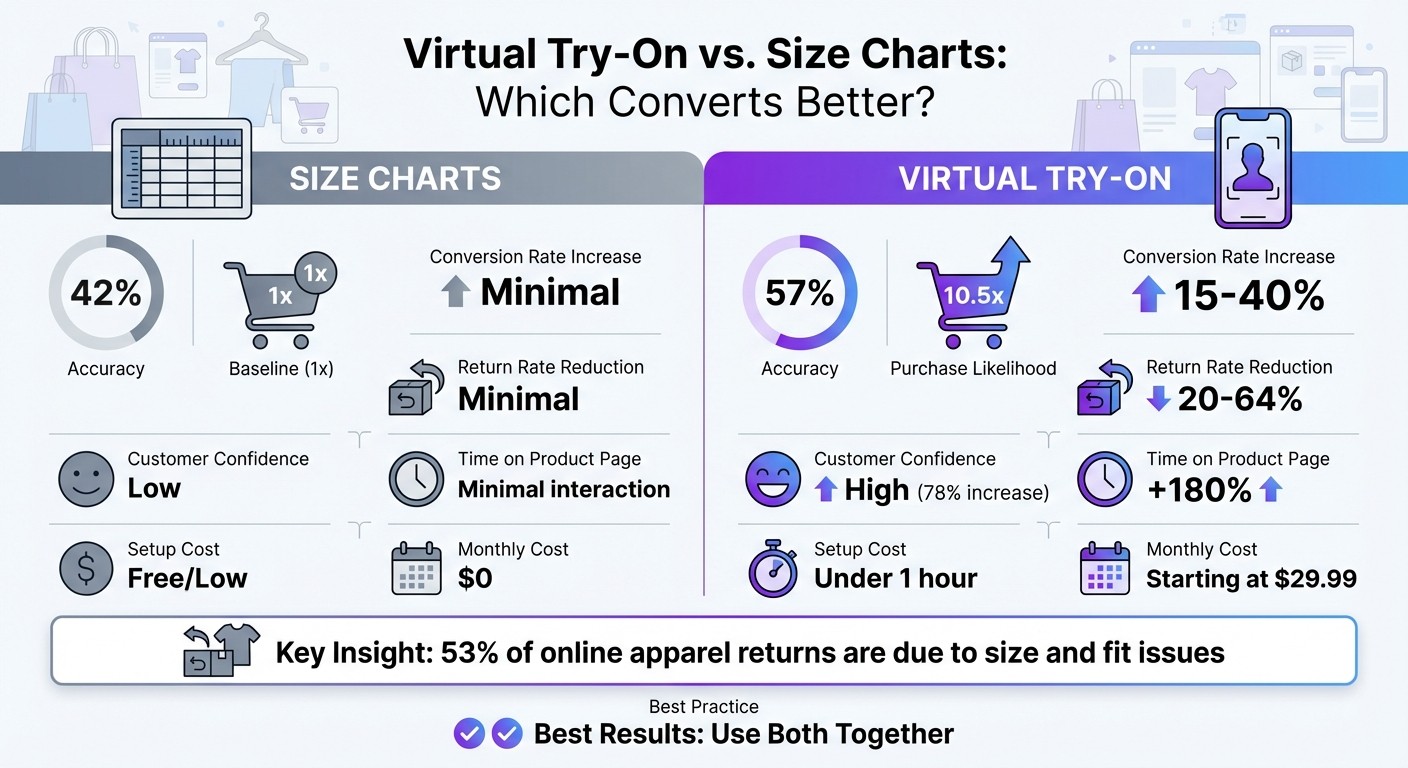
Virtual Try-On vs Size Charts: Conversion Rates and Return Reduction Comparison
Virtual Try-On: How It Changes Online Shopping
What Virtual Try-On Does
Virtual try-on (VTO) technology allows customers to see how products will look on them before making a purchase. By uploading a single photo, shoppers can see a realistic preview of the item on themselves in seconds. AI handles the rest, simulating how items fit and drape - no camera or special hardware required.
Unlike traditional size charts that rely on manual measurements, VTO eliminates much of the uncertainty. For example, customers can instantly see if a jacket will fit snugly across the shoulders or whether a dress will fall at the desired length - all from the convenience of their phone or computer. This interactive feature not only enhances the shopping experience but also has a measurable impact on sales.
How Virtual Try-On Increases Sales
VTO drives higher conversions and fewer returns. Shoppers who engage with AR features are notably more likely to complete a purchase. For example, Rebecca Minkoff implemented 3D media and AR tools on their Shopify Plus store and saw visitors become more likely to add items to their cart and finalize their purchase.
Returns also drop significantly. Under Armour experienced a meaningful year-over-year reduction in returns related to sizing issues after rolling out virtual fitting technology. Asics reported even greater success - customers using their virtual fitting tool were far more likely to complete a purchase compared to those who didn’t. Many retailers report meaningful reductions in return rates as well.
Beyond sales and returns, VTO keeps customers engaged. The technology can extend browsing time, turning passive scrolling into a more interactive experience. This also helps tackle “bracketing”, where customers order multiple sizes to try at home, a practice that inflates both fulfillment costs and return volumes. These results demonstrate why tools like Looksy are transforming Shopify stores.
How Looksy Works for Shopify Stores
Looksy delivers AI-powered virtual try-on tools designed for Shopify stores, prioritizing ease of use and efficiency. Shoppers simply upload a photo and receive instant results - no extra steps required. The tool integrates seamlessly with Shopify’s product catalog and works across all devices, from desktop to mobile.
Looksy offers straightforward pricing: a free plan with unlimited try-ons to get started, and paid plans from $14.99 per month. Every paid plan removes Looksy branding and adds unlimited size help, bundles and email capture that track which products customers are trying on - no features locked behind higher tiers.
Size Charts: What They Do and Where They Fall Short
While virtual try-on tools offer interactive, AI-driven fit previews, traditional size charts stick to static, measurement-based guidance.
What Size Charts Provide
Size charts are designed to match body measurements to standard apparel sizes like Small, Medium, or Large. For U.S. customers, these charts typically include key measurements - bust, waist, hips, and height - listed in inches. For more specialized items, like jeans, they may also include inseam length, thigh circumference, and leg opening width.
They often feature numerical size conversions and brief fit descriptions, along with diagrams to guide users on how to measure themselves accurately. However, unlike virtual try-on tools, size charts lack any visual representation of how clothing might actually fit.
Where Size Charts Work Well
Size charts are affordable, simple to set up, and familiar to most U.S. shoppers. They’re especially effective for products with straightforward sizing needs, such as basic t-shirts or athletic wear, where customers often already know their general size. For new Shopify stores offering simple products, adding a well-designed size chart is a quick way to provide sizing information.
For retailers with international customers, including a toggle between inches and centimeters adds convenience and usability.
Where Size Charts Fall Short
Despite their simplicity, size charts often fail to meet the expectations of today’s shoppers.
One major issue is that many people don’t know their exact measurements. As Morgan Linton, Co-founder of Bold Metrics, explains:
“Very few people have a measuring tape at home, and if they do, the chances they will measure themselves is very low”. Without precise measurements, even the most detailed size charts become a guessing game.
Another challenge is the lack of standardization across brands. A size 6 at one retailer might fit completely differently from a size 6 at another, making it difficult for shoppers to rely on size charts for cross-brand purchases. Even with a detailed chart in hand, shoppers are often left guessing which size will actually fit.
Perhaps the biggest drawback is their inability to address visual fit concerns. A static table can’t show how a jacket will drape or whether a dress will fall at the right length. As Dan Weinsoft, Ecommerce Conversion Strategist at The Good, points out:
“Sizing is frequently the number one reason shoppers cite in their decision to shop in-store versus online”.
Ultimately, size charts can’t replace the confidence that comes from visually seeing how a garment will fit on your own body.
Virtual Try-On vs. Size Charts: Direct Comparison
When it comes to addressing fit uncertainty, Shopify merchants need tools that not only engage customers but also improve conversion rates and cut down on returns. Let’s break down how virtual try-on and size charts stack up against each other.
Conversion Rates and Customer Engagement
Shoppers using virtual try-on are more likely to make a purchase compared to those relying solely on size charts. Virtual try-on also keeps shoppers engaged, increasing time spent on product pages. In contrast, size charts often see minimal interaction, offering little in terms of engagement.
Here’s a quick comparison:
Metric | Size Charts | Virtual Try-On |
|---|---|---|
Size Selection Accuracy | Weaker | Stronger |
Purchase Likelihood | Baseline | Higher |
Conversion Rate Increase | Minimal | Stronger |
Time on Product Page | Minimal interaction | Increased |
Customer Engagement | Low (static content) | High (interactive experience) |
Return Rates and Purchase Confidence
Virtual try-on directly addresses one of the biggest challenges in e-commerce: returns due to poor fit. It helps shoppers pick the right size the first time, which can meaningfully reduce fit-related returns.
Returns are costly - each one adds shipping, processing, and restocking costs. For a busy store, even a modest reduction translates into significant savings.
Virtual try-on also builds buyer confidence. Shoppers who use it report feeling more confident in their purchases, and many say the technology helps them make better decisions. In contrast, size charts provide limited support in this area.
Metric | Size Charts | Virtual Try-On |
|---|---|---|
Return Rate Reduction | Minimal | Stronger |
Customer Confidence | Low | High |
Bracketing Behavior | Common | Significantly reduced |
Decision Support | Limited | Strong |
Setup, Maintenance, and Costs
Size charts are simple and inexpensive to implement - essentially just a table added to product pages. However, they require manual updates for every new collection or size adjustment, and they lack automation or analytics.
Virtual try-on tools, like Looksy, involve an initial integration with your Shopify store, which is designed to be quick. Looksy’s plans start at $14.99/month, offering automated syncing and detailed analytics. These tools can pay for themselves through fewer returns and stronger conversions.
Factor | Size Charts | Virtual Try-On (Looksy) |
|---|---|---|
Setup Time | Minutes (manual entry) | Quick app integration |
Monthly Cost | $0 (internal labor only) | Starting at $14.99/month |
Maintenance | Manual updates per collection | Automated syncing |
Analytics | None | Detailed engagement & conversion tracking |
ROI Timeline | N/A | Varies by store |
Mobile Optimization | Often poor | Works on any device - just a photo upload |
When it comes to boosting sales and reducing returns, virtual try-on consistently outshines size charts. The added engagement, confidence, and cost savings make it a powerful tool for Shopify merchants looking to stay ahead.
Conclusion: Choosing the Right Solution for Your Store
When Virtual Try-On Works Best
Virtual try-on shines when it comes to products that rely heavily on visual appeal. Think eyewear, jewelry, cosmetics, and fashion accessories - items where customers want to see how they’ll look before committing to a purchase. If your store features products where style, color, or overall appearance plays a major role in buying decisions, virtual try-on can be a smart move. It’s especially effective in categories like tops and dresses, which often have high return rates due to sizing uncertainty. By letting shoppers visualize the product on themselves, virtual try-on not only boosts their confidence but also encourages more purchases.
Why Size Charts Still Matter
Size charts are still essential for providing accurate measurements. While virtual try-on enhances the shopping experience, the straightforward and cost-effective nature of size charts keeps them relevant. Before diving into virtual try-on, your store should have clean, standardized size charts with consistent measurements across your product range. These charts also cater to shoppers who prefer traditional measurement-based shopping or those who prefer not to upload a photo. Considering how many apparel returns stem from fit issues, having reliable size charts with clear references - like height and weight guidelines - is a must.
Using Both Tools Together
The best approach? Combine the strengths of both tools. Virtual try-on provides that visual “wow” factor, while size charts deliver the exact measurements shoppers need. Together, they cater to a wide range of customer preferences, helping to reduce returns and boost satisfaction. For Shopify merchants, pairing Looksy (available from $14.99/month) with detailed size charts offers customers both visual and technical support, creating a seamless and confidence-boosting shopping experience.
FAQs
How does virtual try-on technology help online shoppers find the right fit?
Virtual try-on technology lets shoppers visualize how clothes or accessories will look and fit - no need to step into a dressing room. Tools like Looksy use AI to do this from a single uploaded photo: the shopper uploads one picture and sees the product on themselves in about 20 seconds, right on the product page - no live camera feed or avatar setup required.
Some tools go a step further, using 3D body scanning or depth sensors to fine-tune the accuracy. This ensures the virtual items match the shopper’s measurements more closely. Usually built into e-commerce platforms, these features allow customers to explore sizes, tweak views, and confidently pick the right fit - all from the comfort of home.
How can combining virtual try-on and size charts improve customer satisfaction and sales?
Combining virtual try-on technology with size charts gives shoppers a powerful mix of visual and practical information, making them feel more confident about their purchases. Virtual try-ons let customers see how an item might look on them, turning uncertainty into a more interactive and enjoyable shopping experience. Meanwhile, size charts provide detailed measurements, offering clarity for those who want precise sizing or when virtual try-on isn’t an option for certain products.
This combination tackles both the visual appeal and the technical fit, significantly reducing the chances of returns. It also builds trust by allowing customers to verify the virtual try-on results against the size chart. Together, these tools create a smoother shopping journey, boost purchase confidence, and cut down on the need to order multiple sizes - all of which lead to happier customers and stronger loyalty.
What are the costs of adding virtual try-on tools to my online store?
Adding a virtual try-on tool to your online store comes with some upfront and recurring costs, but these are often balanced out by savings from fewer returns. Most providers charge subscription or usage-based fees that cover the AI/AR technology, hosting, and regular updates. Depending on your store’s specific needs, these fees range widely - from affordable options like Looksy, which offers a free plan and paid plans from $14.99/month, to premium platforms that cost far more. Additionally, you might encounter one-time costs for integration, such as syncing the tool with your Shopify store, customizing its design, or training your team to use it effectively.
Despite the investment, the benefits can be substantial. Virtual try-on tools can significantly cut return rates, trim down shipping expenses, and boost conversion rates. By giving customers a better sense of fit and an enhanced shopping experience, these tools not only drive more sales but also help reduce the financial strain caused by returns.