Ecommerce
Shopify Store Optimization Checklist for 2026
Practical checklist to speed up your Shopify store, improve SEO, enhance UX, and boost conversions with AI tools and regular audits.

Want your Shopify store to thrive in 2026? It’s all about speed, personalization, and trust. Shoppers expect fast-loading pages, tailored experiences, and smooth navigation. If your site lags or feels clunky, you risk losing sales. Here’s what you need to know:
Speed is critical: Pages must load in under 2.5 seconds. Slow sites lose 40% of visitors and see conversions drop by 20% with just a 1-second delay.
SEO and structure matter: Use clear URLs, schema markup, and mobile-first design to improve visibility and rankings.
User experience drives sales: Optimize product pages, checkout processes, and mobile performance to keep visitors engaged.
AI tools likeLooksy: Virtual try-ons and visual optimization tools build confidence and reduce returns.
Ongoing monitoring: Regular audits, A/B testing, and performance tracking ensure your store stays competitive.
These strategies focus on improving performance, boosting search visibility, and converting visitors into customers. Let’s dive into the details.
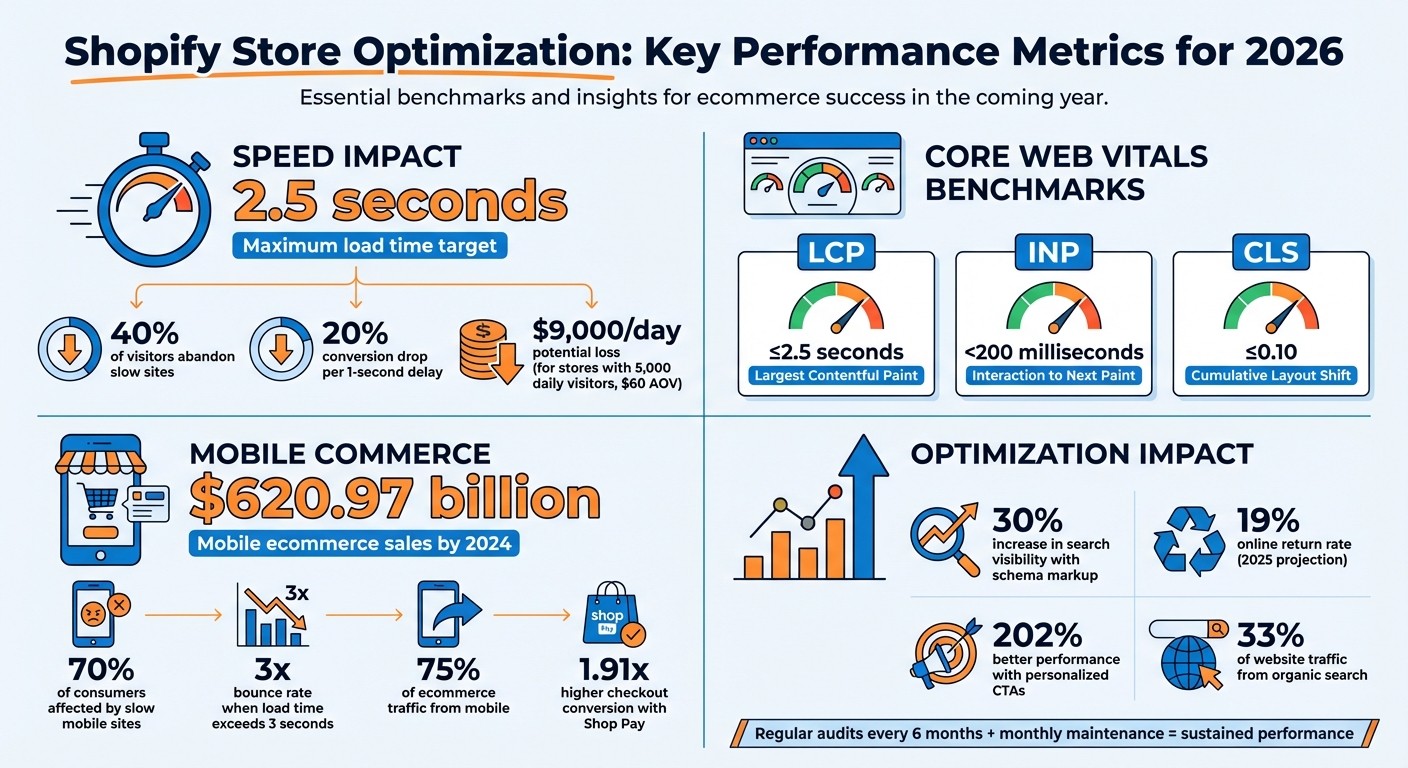
Shopify Store Performance Statistics: Speed, Mobile, and Conversion Impact 2026
Technical Performance and Speed Checklist
When it comes to running an online store, speed isn’t just a nice-to-have - it’s the backbone of your website’s performance. If your pages take longer than 2.5 seconds to load their largest element, you risk losing customers. Google’s Core Web Vitals lay out the benchmarks: Largest Contentful Paint (LCP) should be 2.5 seconds or less, Interaction to Next Paint (INP) under 200 milliseconds, and Cumulative Layout Shift (CLS) no higher than 0.10. These aren’t just tech terms - they directly influence search rankings and conversion rates.
Optimizing Themes and Code
Choosing the right theme is your first step. Shopify’s Online Store 2.0 themes are designed with speed in mind. To even qualify for the Shopify Theme Store, a theme must achieve a minimum Lighthouse performance score of 60 across key pages like home, product, and collection pages. This sets a solid baseline.
When building themes, stick to HTML and CSS, using JavaScript sparingly. Keep JavaScript bundles under 16 KB, and steer clear of heavy libraries like jQuery if native browser features can handle the task. Use tools like the Shopify Theme Inspector for Chrome to pinpoint sluggish Liquid code.
For images, define explicit width and height attributes to prevent layout shifts. Use loading: 'lazy' for offscreen images, and prioritize your hero image with fetchpriority="high". Switching to system fonts can also speed things up by eliminating the delay caused by downloading custom web fonts.
“Quick speed hacks will not build the foundation for long-term performance - only real speed improvements will, and that starts with optimizing your underlying theme architecture.” - Nirav Sheth, CEO and Founder, Anatta
Once your theme is optimized, focus on tailoring these improvements for mobile users.
Improving Mobile Performance
With mobile ecommerce predicted to hit $620.97 billion in sales by 2024, a fast and seamless mobile experience is crucial. Research shows that 70% of consumers say slow-loading websites affect their willingness to buy, and bounce rates nearly triple when load times exceed 3 seconds.
One quick win: disable mobile video autoplay to avoid heavy downloads on slower connections. If you’re embedding YouTube videos, opt for “lite embeds” that load a thumbnail first, saving up to 1 MB of page weight. Regularly audit your third-party apps - stores with more than 20 apps often suffer from background scripts that slow performance.
Also, enable Shop Pay for your mobile checkout. It delivers a 1.91x higher checkout-to-order rate compared to standard checkouts. This is crucial because mobile shoppers, especially those making impulse purchases, won’t stick around for lengthy forms.
Once mobile and desktop speeds are optimized, the next step is to track your progress.
Setting Up Tracking and Analytics
Start with Shopify’s Web Performance dashboard, which tracks real-user Core Web Vitals over a 28-day period. This provides insights into how your store performs for actual visitors, not just in controlled tests.
Use Google PageSpeed Insights for detailed audits of specific pages. It gives you an overall score (0 to 100) and actionable suggestions for improvement. Pair this with Google Search Console to monitor site-wide technical health, indexing issues, and historical Core Web Vitals data. Both tools are free and incredibly useful.
To manage tracking scripts efficiently, consolidate them with Google Tag Manager. This reduces the browser’s workload by bundling all your JavaScript tags into a single request. Use Chrome’s Network tab to identify heavy scripts from third-party apps that might be slowing down your site. Pay special attention to your P75 metric - the 75th percentile of your Core Web Vitals scores - to ensure most users experience a fast-loading website.
Optimizing Search Visibility and Site Structure
To check if your store is indexed, search site:yourdomain.com on Google. Then, submit your Shopify sitemap.xml to both Google Search Console and Bing Webmaster Tools for better indexing.
From there, focus on technical SEO to make sure every product and page is easy to find.
Technical SEO Basics
Start with your URLs - keep them short, descriptive, and use hyphens. For example, opt for /products/red-waterproof-bucket-hat instead of generic product IDs. Title tags should stay under 60 characters, with primary keywords placed at the beginning. Likewise, keep meta descriptions under 160 characters and make them engaging enough to drive clicks.
Your store’s structure matters, too. Ensure every product is no more than three clicks away from the homepage. Breadcrumb navigation (e.g., Home > Men’s Clothing > Jackets) not only helps users but also makes it easier for search engines to crawl your site. Use internal links with descriptive anchor text to connect related products - this signals their importance to search engines.
Check your robots.txt file to block search engines from crawling unnecessary pages like /checkout, /cart, and /orders. Regularly audit your site with tools like Screaming Frog (free for up to 500 URLs) to catch 4xx errors and redirect loops. Fix broken URLs by setting up 301 redirects to relevant live pages.
Once these basics are covered, take your SEO a step further with structured data.
Adding Schema Markup
Structured data can give your site a boost in search visibility. Many modern Shopify themes, like Dawn, come with basic Product schema built in. However, you can enhance this by adding aggregateRating for reviews and offers for pricing and availability, which can make your listings stand out in search results.
“Structured data helps search engines and AI tools better understand and categorize content, which can lead to improved visibility in search results and AI-generated responses.” - Google Developers Team
Add Organization schema to your homepage, including details like your business name, logo, and contact info. Use BreadcrumbList schema across all pages with absolute URLs. For collection pages, consider using CollectionPage or OfferCatalog schema to showcase your product listings effectively. Always validate your structured data with Google’s Rich Results Test to ensure it’s error-free and ready for enhanced search displays. Properly implemented schema markup can increase your search visibility by as much as 30%.
Improving Navigation and Internal Search
Clear navigation and strong internal linking are just as important as good SEO. Organize your menu by popularity to make top-selling items easy to find. Use filters like brand, size, and color to help shoppers refine their searches while avoiding duplicate content issues. Limit the use of excessive product tags that could generate unnecessary URLs.
Since about 75% of e-commerce traffic comes from mobile devices, make sure touch targets are at least 44 pixels wide for easy navigation. A well-organized FAQ page can also address common customer questions and capture long-tail search queries. For broken links, redirect users to a branded 404 page that guides them back to active collections.
When it comes to collection descriptions, split them smartly. Place a short, concise intro above the product grid for immediate context, and include a longer, keyword-rich description with H2 headers below the grid. This approach keeps the shopping experience clean while still boosting SEO.
Improving User Experience and Conversion Rates
Once your site’s structure and SEO are in good shape, the next challenge is converting visitors into customers. Even small tweaks to your product pages, checkout process, and personalization efforts can lead to noticeable gains in sales. With a solid foundation in place, these strategies can help turn interest into action.
Optimizing Product Pages
A good product page does more than just describe what you’re selling - it builds trust and eliminates doubts. Start with high-quality visuals. Include multiple angles, lifestyle shots, and even 360-degree views to make your products more appealing and reduce uncertainty. You can also link images directly to product variants, like different sizes or colors, to make shopping easier.
When it comes to product descriptions, focus on how the product benefits the customer. Instead of listing features, explain how it improves daily life. Keep the text short and easy to scan by using active language, bullet points, and brief paragraphs.
Social proof is another must-have. Prominently display star ratings, customer reviews, and user-generated content. These elements are crucial since 85% of shoppers say detailed product information and visuals influence their buying decisions. Make sure the “Add to Cart” button is easy to spot - place it above the fold and use clear, high-contrast text like “Buy Now” or “Add to Cart.”
“The paramount goal for your product pages should be to build user confidence by providing all the information necessary for a purchasing decision and making the process as intuitive and straightforward as possible.”
– Rosara Joseph, Content Strategist, VentureWeb
For mobile users, ensure buttons are large enough to tap easily (around 7-10 mm), and optimize image loading speeds for a seamless experience. Use collapsible tabs for detailed information like sizing charts or technical specs to keep the layout clean. Subtle urgency cues, like “Only 3 left in stock”, and showing both original and discounted prices can encourage hesitant buyers to act.
Streamlining Checkout and Building Trust
Once you’ve captured a customer’s attention, the checkout process should be smooth and trustworthy. Cart abandonment rates hover around 70.19%, often due to unexpected costs revealed late in the process. To combat this, display all costs upfront - even before checkout begins.
Simplify the process by offering guest checkout, as requiring account creation deters 25% of potential buyers. Keep forms minimal by asking only for essential information, and use autofill to speed things up. Accelerated checkout options like Shop Pay can also make a difference - it converts nearly twice as well on mobile compared to standard checkouts.
Offering flexible payment options is another way to build trust. Include digital wallets like Apple Pay and Google Pay, traditional credit cards, and “Buy Now, Pay Later” services. Display payment logos and trust signals like SSL certificates, security badges, and clear return policies to reassure shoppers, especially the 19% who abandon carts over security concerns.
Real-world examples prove the impact of a streamlined checkout. In 2025, Peepers, an eyewear brand, moved to Shopify Plus and added features like cross-sells, customer reviews, and live chat support. These updates boosted their conversion rate by 30% and their average order value by 20%. Similarly, Pura, a scent diffuser company, improved its checkout conversion rate by 15% after simplifying their process.
For abandoned carts, timing is critical. Send a recovery email within the first hour of abandonment, as this is when customers are most likely to come back. Exit-intent pop-ups offering discounts or free shipping can also help retain shoppers who are about to leave.
Personalization and Cross-Selling
Personalization isn’t just a nice touch - it’s a powerful way to deepen customer engagement and increase sales. Personalized calls-to-action perform 202% better than generic ones. Use customer data to suggest complementary products. For example, if someone buys a camera, recommend lenses or memory cards on the confirmation page or in follow-up emails.
Reward loyalty with automatic discounts for returning customers or those buying in bulk. Apps that create “Frequently Bought Together” bundles or dynamic product recommendations based on the cart’s contents can also encourage additional purchases.
Don’t forget to optimize these features for mobile users. With mobile devices driving over 40% of B2B revenue, ensure that cross-sell and recommendation tools work seamlessly on smaller screens. A smooth mobile experience can make all the difference in capturing extra sales.
AI Virtual Try-On and Visual Optimization with Looksy
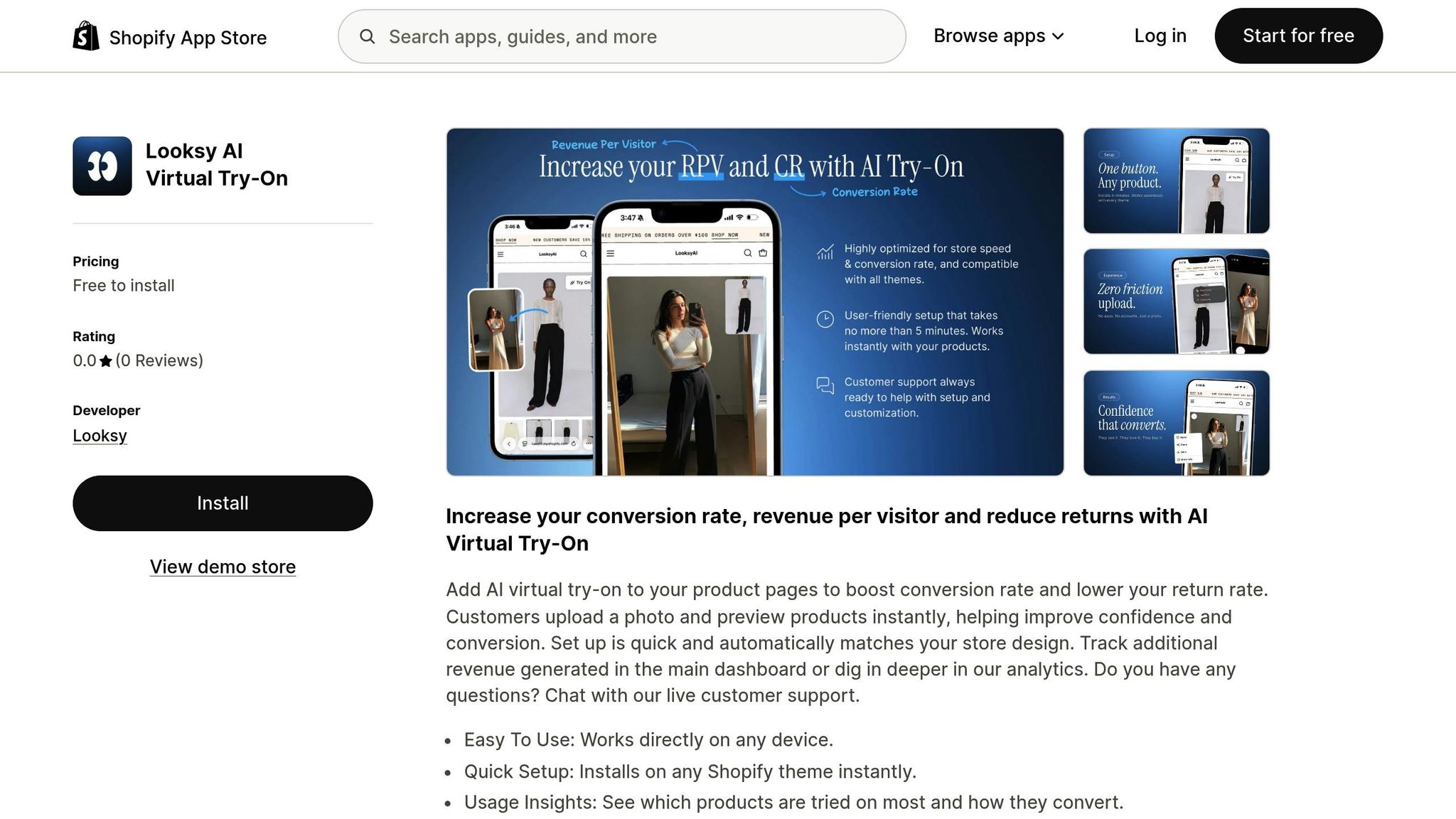
AI virtual try-on with Looksy takes customer confidence to the next level by offering interactive visuals that make online shopping more engaging and precise. By combining augmented reality (AR) and artificial intelligence (AI), this tool allows shoppers to preview products, helping to reduce uncertainties about size and style - two major hurdles in online retail. These features align with earlier strategies aimed at improving visual appeal and user experience. According to the National Retail Federation, online return rates are projected to exceed 19% by 2025, with sizing issues being a leading factor. Virtual try-on tools tackle these challenges head-on, making online shopping more reliable and convenient.
Setting Up Looksy for Your Store
To get started, install Looksy from the Shopify App Store, which seamlessly integrates its widget into your product pages. Focus on high-visual-impact categories like apparel or eyewear, and place a prominent “Try it on now” button above the fold to grab attention.
Prepare your product images by using high-resolution files (minimum 2048 x 2048 pixels) and optimizing them for faster loading. Save images in WebP format, as it compresses files to 25–35% smaller than JPEGs while maintaining quality[44,46,47]. Before launching, test the feature on a staging theme to ensure AR elements load within three seconds[45,46]. Keep an eye on the “time-to-interaction” metric to confirm that the virtual try-on doesn’t slow down your page performance.
Increasing Conversions with Looksy
Once set up, Looksy can help drive conversions by enhancing customer engagement. Display the virtual try-on option prominently on product pages where fit and appearance are critical. Shoppers who use interactive tools like this tend to feel more confident in their choices, which often leads to higher conversion rates. Use Looksy’s built-in analytics to track try-on sessions, conversion rates, and returns, giving you a clear picture of your ROI.
“Virtual fitting rooms reduce uncertainty about fit and style - two of the biggest barriers to online purchasing - helping customers commit with confidence.” – Shopify
To further build trust, pair Looksy with customer reviews, secure payment badges, and clear return policies. Personalized experiences are key to keeping shoppers engaged, especially on mobile devices. Make sure the try-on feature is optimized for smaller screens to provide a seamless experience[45,46].
Maintaining Privacy and Transparency
Just as a smooth checkout process fosters trust, protecting customer privacy is essential for building confidence in your store. When handling customer images and body data, prioritize security by encrypting all data transfers with SSL certificates[7,11]. Use clear consent forms to explain how photos are processed, stored, and deleted, ensuring compliance with regulations like GDPR or CCPA. Transparency about encryption and deletion policies reassures customers that their data is handled securely and responsibly.
Ongoing Optimization and Monitoring
After addressing technical, SEO, and UX updates, the key to sustained success lies in regular monitoring and fine-tuning. Optimization is not a one-and-done task - it’s a continuous effort to keep your store competitive and aligned with customer expectations. Routine audits and data-driven testing allow you to quickly spot issues, respond to shifts in user behavior, and protect the progress you’ve already made.
Regular Maintenance and Performance Audits
Plan for a full site audit every six months, paired with monthly maintenance checks to catch and resolve technical hiccups early. These monthly reviews should prioritize Core Web Vitals, such as Largest Contentful Paint (LCP), First Input Delay (FID), and Cumulative Layout Shift (CLS). Additionally, check for broken links, ensure images are optimized, and monitor overall site performance. Tools like PageSpeed Insights and Google Search Console can help confirm that essential elements like HTTPS security, robots.txt, and XML sitemaps are functioning as expected. Aim for page load times under 2.5 seconds to reduce the risk of losing shoppers due to slow performance.
“It’s a good opportunity to take a more comprehensive look at a website in a way that most business owners or site operators don’t do on a day-to-day basis. It’s kind of like going over your financials once or twice a year.” – Kyle Risley, SEO Lead, Shopify
Make sure all key features - such as search functions, discount codes, and payment gateways - are fully operational. Compress images to under 300KB to keep load times fast. Address 404 errors and redirect loops using tools like Screaming Frog, as these issues waste valuable crawl budget and frustrate users.
Once regular audits are in place, shift your attention to testing and refining based on actionable data.
Testing and Iterating Based on Data
A/B testing is a powerful way to determine what truly improves conversions. Focus on one element at a time - such as the color of a call-to-action button or the layout of a product page - and run each test for at least two weeks to gather statistically reliable results. Shopify’s Web Performance dashboards provide real-world data across devices, helping you evaluate how your site performs in different browsers and locations. Keep an eye on metrics like conversion rate, average order value (AOV), and cart abandonment rate to identify areas for improvement.
For instance, All4cycling leveraged Shopify Flow to automate their order management processes, which resulted in a 40% increase in conversion rates and a 35% boost in revenue. Also, don’t overlook your internal search functionality - it can account for as much as 42% of your store’s total revenue.
Localizing for U.S. Shoppers
For U.S. customers, ensure your store displays prices in the $X,XXX.XX format, uses MM/DD/YYYY for dates, and applies imperial units where relevant. Double-check that payment gateways, tax calculations, and shipping options are configured correctly for U.S. transactions, and ensure compliance with regulations like the California Consumer Privacy Act (CCPA) if you serve California-based customers. Automated tools can help maintain consistency in currency symbols and date formats across your site. Test your store by simulating a U.S. user’s environment, including time zones and IP addresses, to ensure everything functions smoothly. And since mobile devices drive 41% of ecommerce traffic, confirm that all localized features work seamlessly on screens of all sizes.
Conclusion: Key Takeaways for Shopify Store Optimization
Shopify store success in 2026 hinges on four key areas: technical performance, search visibility, user experience, and visual appeal.
Speed matters. Keep your load times under 2.5 seconds. Why? A single second of delay can cost a store with 5,000 daily visitors and a $60.00 average order value around $9,000.00 in lost sales per day. Regularly refine your code, optimize image sizes, and review third-party apps monthly to avoid unnecessary slowdowns.
On the SEO side, focus on the essentials like schema markup, internal linking, and mobile-first indexing. With organic search driving 33% of website traffic, your content must be engaging and thorough to stand out. Pair strong SEO with a seamless shopping experience - tools like Shop Pay can make a difference, offering a 1.91x higher mobile checkout-to-order rate compared to guest checkouts.
Visual tools are another game-changer. Features like Looksy let customers see how products look on them, boosting trust and easing purchase decisions. To keep your site running smoothly, ensure third-party scripts load asynchronously.
To stay ahead, adopt a proactive approach. Schedule in-depth audits every six months and perform monthly maintenance to address issues before they escalate. Use A/B testing to fine-tune individual elements, and localize your store for U.S. shoppers by displaying prices in the $X,XXX.XX format and using MM/DD/YYYY for dates. Remember: fast-loading stores convert, while slow ones lose out.
FAQs
How can I make sure my Shopify store loads in less than 2.5 seconds?
To keep your Shopify store loading swiftly - ideally under 2.5 seconds - you’ll need to fine-tune some critical performance aspects. Start by compressing images to shrink file sizes without sacrificing quality. Another smart move is enabling lazy loading, so images only load when they become visible on the screen, saving precious load time.
Leverage AI-powered tools and edge-based techniques to enhance Core Web Vitals, with special attention to improving Largest Contentful Paint (LCP) - a key metric for user experience.
Don’t overlook the impact of bulky media files and unnecessary third-party scripts. Clearing out these resource hogs can drastically cut down load times, creating a faster, smoother experience for your visitors, which can translate to higher conversions.
What are the best SEO strategies to boost my Shopify store’s visibility?
To boost your Shopify store’s visibility, start by laying down a solid technical foundation. Ensure your site uses HTTPS for all pages to secure user data and build trust. Submit an updated XML sitemap through Google Search Console to help search engines index your site efficiently. Adjust your robots.txt file to block non-essential pages, like cart or admin sections, to focus search engine crawlers on the pages that matter most. Speed also plays a huge role - compress images, minimize the use of heavy apps, and choose a fast-loading theme to keep your load time under three seconds. Additionally, a logical site structure (e.g., home → collections → product pages) paired with clean, keyword-focused URLs makes navigation easier for both users and search engines.
For on-page SEO, start with thorough keyword research and weave those terms naturally into your product titles, meta descriptions, headings, and image alt text. Craft unique, engaging product descriptions that not only inform but also entice shoppers. Consider creating blog content that answers common customer questions or provides helpful tips - this can drive traffic and improve your rankings.
When it comes to off-page SEO, focus on building high-quality backlinks. Collaborate with partners, contribute guest posts, or work with influencers to generate links back to your store. Regular maintenance is also key: audit your site often to fix broken links, eliminate duplicate content, and ensure your schema markup is accurate. By consistently applying these techniques, you’ll improve your store’s chances of ranking higher in U.S. search results.
How does Looksy’s AI virtual try-on feature improve the shopping experience?
Looksy’s virtual try-on feature, powered by AI, takes online shopping to a whole new level. It lets customers see how products will look in real time, giving them a clear and interactive preview before they commit to a purchase.
This tool doesn’t just make shopping more fun - it helps shoppers feel more confident about their choices. By cutting down on guesswork and tailoring the experience to individual preferences, it boosts satisfaction and reduces the hassle of returns. It’s a smart way to combine the ease of online shopping with the reassurance of trying things out, bringing convenience and confidence to every purchase.