> ## Documentation Index
> Fetch the complete documentation index at: https://withlooksy.com/docs/llms.txt
> Use this file to discover all available pages before exploring further.
# Connect Klaviyo
> Connect Klaviyo to receive eligible Looksy try-on, size-recommendation, add-to-cart, and consented email-capture activity.
Looksy can connect to Klaviyo so eligible shopper activity can support Klaviyo segments and flows. Looksy's current integration includes consented email capture and three intent events.
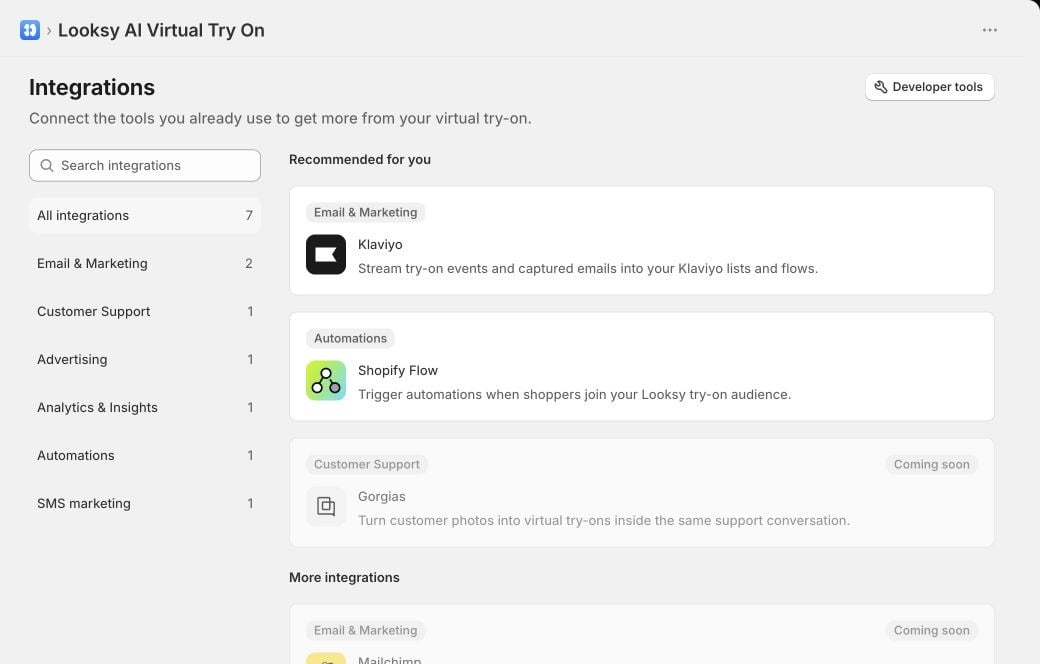
Integration availability can depend on your Looksy environment. Continue only when **Klaviyo** appears as an interactive card under **Integrations**. If it is absent or marked unavailable, contact Looksy support.
 ## Connect Klaviyo
1. In **Shopify Admin**, open **Looksy**.
2. Select **Integrations**, then choose **Klaviyo**.
3. Select **Connect**.
4. Review and approve the requested access in Klaviyo.
5. Return to Looksy and confirm that the status is **Connected**.
6. Choose the merchant-owned Klaviyo list that should receive captured emails.
7. Select **Save**.
If the list you need is missing, create it in Klaviyo, then return to Looksy and select **Refresh lists**.
## Configure email capture
The selected Klaviyo list controls where consented addresses are added. The timing of Looksy's shopper email prompt is managed separately:
1. In Looksy, open **Settings**.
2. Open **Photo & Video**.
3. Configure photo or Live Video email capture and save.
Do not use a list unless its consent and messaging settings match how you intend to contact shoppers. Looksy's event path does not turn an unsubscribed shopper into a subscribed one without explicit capture consent.
## Events sent to Klaviyo
| Event | When it applies |
| ------------------------------------------- | ----------------------------------------------------------------------------------------------------- |
| `Tried On` | A shopper completes a virtual try-on and has an eligible consent-linked identity. |
| `Looksy Size Recommended` | An eligible shopper receives a product-specific size recommendation. |
| `Looksy Product Added to Cart After Try-On` | An eligible shopper adds the tried-on product and variant to the cart within two hours of the try-on. |
Shopify's Klaviyo app sends `Placed Order` separately; Looksy does not replace that event.
Looksy does not send raw shopper uploads, raw body measurements, names, postal addresses, or phone numbers as these event properties. Size-recommendation events contain the recommended size and confidence rather than the shopper's measurements.
## Remove the integration
1. Open **Looksy → Integrations → Klaviyo**.
2. Select **More actions**.
3. Select **Remove integration**.
4. Confirm **Remove Klaviyo**.
Removing the integration stops Looksy's Klaviyo events and email capture, and removes the saved list selection and connection from Looksy.
## Troubleshooting
Select **Reconnect** on the Klaviyo integration page. Looksy can keep email capture available while event delivery waits for the required event permission.
Refresh the available lists, then select a current list and save. If no lists appear, create one in Klaviyo first.
If Looksy reports that Klaviyo is not configured for the current environment, contact Looksy support. Do not send OAuth credentials by email.
## Connect Klaviyo
1. In **Shopify Admin**, open **Looksy**.
2. Select **Integrations**, then choose **Klaviyo**.
3. Select **Connect**.
4. Review and approve the requested access in Klaviyo.
5. Return to Looksy and confirm that the status is **Connected**.
6. Choose the merchant-owned Klaviyo list that should receive captured emails.
7. Select **Save**.
If the list you need is missing, create it in Klaviyo, then return to Looksy and select **Refresh lists**.
## Configure email capture
The selected Klaviyo list controls where consented addresses are added. The timing of Looksy's shopper email prompt is managed separately:
1. In Looksy, open **Settings**.
2. Open **Photo & Video**.
3. Configure photo or Live Video email capture and save.
Do not use a list unless its consent and messaging settings match how you intend to contact shoppers. Looksy's event path does not turn an unsubscribed shopper into a subscribed one without explicit capture consent.
## Events sent to Klaviyo
| Event | When it applies |
| ------------------------------------------- | ----------------------------------------------------------------------------------------------------- |
| `Tried On` | A shopper completes a virtual try-on and has an eligible consent-linked identity. |
| `Looksy Size Recommended` | An eligible shopper receives a product-specific size recommendation. |
| `Looksy Product Added to Cart After Try-On` | An eligible shopper adds the tried-on product and variant to the cart within two hours of the try-on. |
Shopify's Klaviyo app sends `Placed Order` separately; Looksy does not replace that event.
Looksy does not send raw shopper uploads, raw body measurements, names, postal addresses, or phone numbers as these event properties. Size-recommendation events contain the recommended size and confidence rather than the shopper's measurements.
## Remove the integration
1. Open **Looksy → Integrations → Klaviyo**.
2. Select **More actions**.
3. Select **Remove integration**.
4. Confirm **Remove Klaviyo**.
Removing the integration stops Looksy's Klaviyo events and email capture, and removes the saved list selection and connection from Looksy.
## Troubleshooting
Select **Reconnect** on the Klaviyo integration page. Looksy can keep email capture available while event delivery waits for the required event permission.
Refresh the available lists, then select a current list and save. If no lists appear, create one in Klaviyo first.
If Looksy reports that Klaviyo is not configured for the current environment, contact Looksy support. Do not send OAuth credentials by email.