> ## Documentation Index
> Fetch the complete documentation index at: https://withlooksy.com/docs/llms.txt
> Use this file to discover all available pages before exploring further.
# Try-On API and Webhooks
> Generate Looksy try-ons through the server-to-server API and verify HMAC-signed webhooks from recorded storefront try-ons.
## What developer tools does Looksy provide?
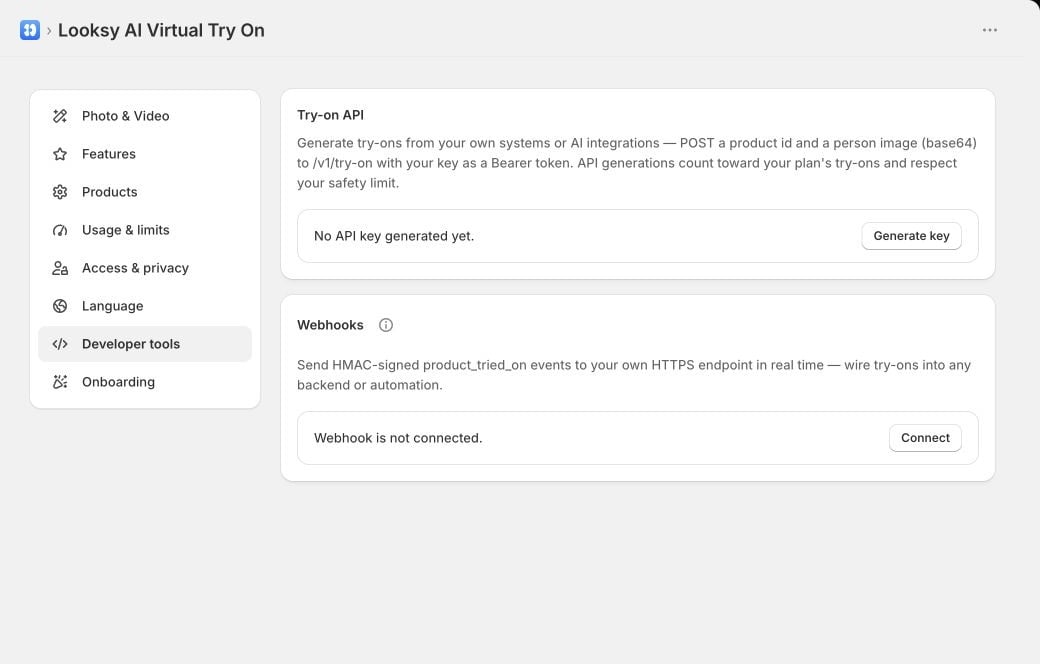
Looksy provides a server-to-server try-on endpoint authenticated with a per-store API key and an outbound webhook for completed storefront product try-ons recorded by Looksy's event pipeline. Both are configured under **Looksy → Settings → Developer tools**.
API generations use the same product configuration, plan usage, and billing-period safety limit as storefront generations.
 ## Generate an API key
1. Open **Settings → Developer tools**.
2. Under **Try-on API**, select **Generate key**.
3. Copy the key immediately and store it as a secret.
Looksy shows the full key once and stores only its hash. Regenerating the key invalidates the previous key immediately. Revoking it makes every request using that key fail.
Never place a Looksy API key in browser JavaScript, a theme asset, a public repository, or a support message. Call the API from a trusted server.
## Send a try-on request
Send `POST https://withlooksy.gadget.app/v1/try-on` with JSON and the API key as a Bearer token.
```bash theme={null}
curl https://withlooksy.gadget.app/v1/try-on \
--request POST \
--header "Authorization: Bearer $LOOKSY_API_KEY" \
--header "Content-Type: application/json" \
--data '{
"productId": "gid://shopify/Product/1234567890",
"variantId": "gid://shopify/ProductVariant/9876543210",
"image": "data:image/jpeg;base64,"
}'
```
The request fields are:
| Field | Required | Description |
| ----------- | ------------------------------------- | ------------------------------------------------------------------------ |
| `productId` | Yes | Shopify product numeric ID or Product GID. |
| `variantId` | No | Shopify variant numeric ID or ProductVariant GID. |
| `image` | Yes | JPEG, PNG, or WebP as a data URL or raw base64 string. |
| `mimeType` | When raw base64 needs a non-JPEG type | `image/jpeg`, `image/png`, or `image/webp`. Raw base64 defaults to JPEG. |
A successful response includes `success`, the generated `image`, and the resolved product and variant IDs. A rate-limited response uses HTTP `429` and includes `Retry-After`.
Common error codes include `MISSING_OR_INVALID_KEY`, `INVALID_BODY`, `INVALID_PRODUCT`, `INVALID_VARIANT`, `MISSING_IMAGE`, `UNSUPPORTED_IMAGE_TYPE`, `INVALID_IMAGE`, `REQUEST_TOO_LARGE`, `RATE_LIMITED`, and `INTERNAL_ERROR`. Generation and account checks can return other bounded error codes; handle non-success responses without assuming an image is present.
## Connect a webhook
Under **Developer tools → Webhooks**, enter a public HTTPS endpoint. Looksy requires HTTPS, rejects credential-bearing URLs, and blocks common literal local or private hostnames. Use an endpoint that is publicly routable and protected by the signature check below.
Copy the signing secret when it appears. Connecting a different endpoint rotates that secret.
Looksy currently sends:
* `product_tried_on` when Looksy records a successful storefront `try_on_success` event for a product.
Server-to-server generations through `POST /v1/try-on` do not emit this storefront webhook. If your integration needs to track its own API requests, record the API response in your system rather than waiting for `product_tried_on`.
Every request includes:
| Header | Meaning |
| -------------------- | ------------------------------------------------------------- |
| `x-looksy-signature` | `sha256=` HMAC-SHA256 signature of the raw request body. |
| `x-looksy-event` | Event type, currently `product_tried_on`. |
| `x-looksy-shop-id` | The Looksy shop ID that produced the event. |
The JSON payload can include the shop domain, product and variant IDs and titles, a hashed anonymous visitor identity, a logged-in Shopify customer ID when known, occurrence time, and event ID. Treat nullable fields as optional context rather than delivery guarantees.
## Verify the signature
Compute HMAC-SHA256 over the exact raw request bytes using the signing secret. Compare the complete `sha256=` value with a constant-time comparison before parsing or acting on the event.
```js theme={null}
import { createHmac, timingSafeEqual } from "node:crypto";
export function verifyLooksyWebhook(rawBody, secret, signature) {
const expected = `sha256=${createHmac("sha256", secret)
.update(rawBody, "utf8")
.digest("hex")}`;
const expectedBytes = Buffer.from(expected, "utf8");
const receivedBytes = Buffer.from(signature || "", "utf8");
return expectedBytes.length === receivedBytes.length
&& timingSafeEqual(expectedBytes, receivedBytes);
}
```
Reject a request when the signature is missing or invalid. Use `eventId` for idempotency because webhook deliveries may be retried.
## Delivery and retry behavior
Webhook delivery is best-effort. Looksy retries network failures and HTTP `408`, `429`, or `5xx` responses up to three times after the initial attempt, using exponential backoff. Other non-success responses are not retried. After the final failed attempt, the delivery is dropped.
Return a `2xx` response only after the event has been safely accepted. Keep webhook processing fast and move slow work to your own queue.
Test API and webhook handling without real shopper data. Do not send API keys, webhook secrets, or shopper images to Looksy support.
## Generate an API key
1. Open **Settings → Developer tools**.
2. Under **Try-on API**, select **Generate key**.
3. Copy the key immediately and store it as a secret.
Looksy shows the full key once and stores only its hash. Regenerating the key invalidates the previous key immediately. Revoking it makes every request using that key fail.
Never place a Looksy API key in browser JavaScript, a theme asset, a public repository, or a support message. Call the API from a trusted server.
## Send a try-on request
Send `POST https://withlooksy.gadget.app/v1/try-on` with JSON and the API key as a Bearer token.
```bash theme={null}
curl https://withlooksy.gadget.app/v1/try-on \
--request POST \
--header "Authorization: Bearer $LOOKSY_API_KEY" \
--header "Content-Type: application/json" \
--data '{
"productId": "gid://shopify/Product/1234567890",
"variantId": "gid://shopify/ProductVariant/9876543210",
"image": "data:image/jpeg;base64,"
}'
```
The request fields are:
| Field | Required | Description |
| ----------- | ------------------------------------- | ------------------------------------------------------------------------ |
| `productId` | Yes | Shopify product numeric ID or Product GID. |
| `variantId` | No | Shopify variant numeric ID or ProductVariant GID. |
| `image` | Yes | JPEG, PNG, or WebP as a data URL or raw base64 string. |
| `mimeType` | When raw base64 needs a non-JPEG type | `image/jpeg`, `image/png`, or `image/webp`. Raw base64 defaults to JPEG. |
A successful response includes `success`, the generated `image`, and the resolved product and variant IDs. A rate-limited response uses HTTP `429` and includes `Retry-After`.
Common error codes include `MISSING_OR_INVALID_KEY`, `INVALID_BODY`, `INVALID_PRODUCT`, `INVALID_VARIANT`, `MISSING_IMAGE`, `UNSUPPORTED_IMAGE_TYPE`, `INVALID_IMAGE`, `REQUEST_TOO_LARGE`, `RATE_LIMITED`, and `INTERNAL_ERROR`. Generation and account checks can return other bounded error codes; handle non-success responses without assuming an image is present.
## Connect a webhook
Under **Developer tools → Webhooks**, enter a public HTTPS endpoint. Looksy requires HTTPS, rejects credential-bearing URLs, and blocks common literal local or private hostnames. Use an endpoint that is publicly routable and protected by the signature check below.
Copy the signing secret when it appears. Connecting a different endpoint rotates that secret.
Looksy currently sends:
* `product_tried_on` when Looksy records a successful storefront `try_on_success` event for a product.
Server-to-server generations through `POST /v1/try-on` do not emit this storefront webhook. If your integration needs to track its own API requests, record the API response in your system rather than waiting for `product_tried_on`.
Every request includes:
| Header | Meaning |
| -------------------- | ------------------------------------------------------------- |
| `x-looksy-signature` | `sha256=` HMAC-SHA256 signature of the raw request body. |
| `x-looksy-event` | Event type, currently `product_tried_on`. |
| `x-looksy-shop-id` | The Looksy shop ID that produced the event. |
The JSON payload can include the shop domain, product and variant IDs and titles, a hashed anonymous visitor identity, a logged-in Shopify customer ID when known, occurrence time, and event ID. Treat nullable fields as optional context rather than delivery guarantees.
## Verify the signature
Compute HMAC-SHA256 over the exact raw request bytes using the signing secret. Compare the complete `sha256=` value with a constant-time comparison before parsing or acting on the event.
```js theme={null}
import { createHmac, timingSafeEqual } from "node:crypto";
export function verifyLooksyWebhook(rawBody, secret, signature) {
const expected = `sha256=${createHmac("sha256", secret)
.update(rawBody, "utf8")
.digest("hex")}`;
const expectedBytes = Buffer.from(expected, "utf8");
const receivedBytes = Buffer.from(signature || "", "utf8");
return expectedBytes.length === receivedBytes.length
&& timingSafeEqual(expectedBytes, receivedBytes);
}
```
Reject a request when the signature is missing or invalid. Use `eventId` for idempotency because webhook deliveries may be retried.
## Delivery and retry behavior
Webhook delivery is best-effort. Looksy retries network failures and HTTP `408`, `429`, or `5xx` responses up to three times after the initial attempt, using exponential backoff. Other non-success responses are not retried. After the final failed attempt, the delivery is dropped.
Return a `2xx` response only after the event has been safely accepted. Keep webhook processing fast and move slow work to your own queue.
Test API and webhook handling without real shopper data. Do not send API keys, webhook secrets, or shopper images to Looksy support.